Do you know how to protect your blog content?

Back it up!

What happens if your blog crashes?

We back up our computers, or should, but unfortunately most of us assume the internet keeps our web stuff safe. But what if?

You’ve spent months, maybe even years on your blog and what if one morning you woke up to find it gone?

Starting from scratch is a nightmare. Not to mention an overwhelming feeling of loss. All those posts, stories and articles gone, floating around in cyberspace.

So if you haven’t done it already, take a minute and back up your website to your hard drive.

Here is how-

  1. Go to WordPress Admin Page (dashboard.)
  2. Find “Tools”
  3. Under Tools open “Export” Page
  4. On the “Export Page” select “Posts”
    • Here you can select “All”
  5. You can also select “Pages,” etc.
    • Everything selected?

Okay, still with me?

Next, at the bottom of the page, click “Download Export File” Button

  • A message from WordPress pops up stating you will receive an email link to the file.
  • Once you receive this email. Simply click on the link and save to your hard drive.

Now when you back up your computer, your website is backed up too. Safe and sound.

Just don’t crash your computer the same day the internet is taken over by aliens from Mars.

If y’all are really good housekeepers, my apologies for this old information.

But for us sloppy people, it’s a good reminder to stay electronically organized. 

What about it folks?

Do you back up your blogs on a regular basis?

What about your computer? Do you back it up to an external hard drive? 

If so how often do you think is necessary for either process?
Once, twice a year or more often? Inquiring minds want to know.

Happy Leap Year Every One!

Talk to me in the comments section or on Twitter @jeancogdell, Facebook at jean.cogdell and Amazon.com, stop by and say hey! Please remember to with a click and share this post with your Twitter peeps and Facebook fans.


Are you timid about promoting your book?

Do you fear sounding like a Twitter or Facebook Harpie?

Buy mine! Buy Mine! Buy Mine!

buy_mine

Well, I do.

I want to sell my little book as much as any other author, but I don’t want to beg. There has to be a better way than flooding social media with ads.

Thanks to Chris over at THE STORY READING APE for another terrific find. I don’t know where he manages to find so many amazing and informative websites, but I’m so glad he does.

I devoured this one on how to market a book without posting ads by the thousands on Twitter, Facebook or Instagram.

As an introvert, some of these would be difficult for me, but one of my goals for 2016 is to move a little more out of my comfort zone. The first step toward that goal, is participating in a local Author Con in the Spring.

You may not want to use all of her tips, but even one or two of these ideas could be the springboard you’ve been searching for to launch your book.

Are you ready to move beyond social media to promote your book?

Could you do a book fair, meet with a book club or do an interview with the local media?

Or how about my favorite on her list, create a holiday

Click below and read the entire article. Let me know which of her ideas you think have merit.

How to promote a book without using social media by Author Sandra Beckwith

What did you do to market your book? Did it work? 

Talk to us. Inquiring minds want to know.

You can find me on Twitter @jeancogdell, Facebook at jean.cogdell and Amazon.com, stop by and say hey! Please remember to with a click and share this post with your Twitter peeps and Facebook fans.


Do you want to know more? Read more!

Don’t you just love the internet!

It’s so easy to spend hours reading article after article on how to do any and everything from, publishing an ebook to refinishing a table.

First off, let me start by saying I am not an expert. I’m still learning, but I’ve learned a lot over the last few years. A lot about writing, publishing and blogging. The world-wide web is a wonderful place. And with the help of other writers, editors and bloggers learning more every day. One thing I’ve learned. There is only so much editing a writer can do on their own. 

Unless you are a professional editor, hire one. This is one thing, it’s best not to do yourself. At least not all of it. For a book to be edited to a polished spit shine it takes a professional. 

So If you’re looking for an editor here are a few tips.

First, a couple of don’ts.

  1. For the love of God, don’t ask friends to edit your book.
    • Well, I guess it’s okay if you have too many friends and this one has gotten on your last nerve.
  2. And, unless you hate your family, don’t ask Aunt Tillie, that’s got disaster written all over it.
    • Of course, maybe you don’t want to attend Thanksgiving dinner next year.

Now that we’ve gotten the don’ts out-of-the-way, where do you find an editor?

You can start at your local library. 
  • This might surprise you, they might fuss because you didn’t bring back that book from 1989 but they’ll still help you out.
teacher-359311_640
You can ask for referrals on Linked In
  • I found my wonderful editor through a contact on Linked In.

After you’ve found an editor – now what? 

banner-1090830_640

Ask lots of questions.

Do they have a website?

  • Does the website look professional? 
  • Having a website is not a must but it does raise more questions?
Does their style match yours? The correct genre.
  • Remember, different strokes for different folks. Blood and guts, BDSM, or Hot in Texas is not everyone’s cup of tea. If you write murder mysteries, but they edit children’s books this editor is going to barf at the first bloody scene. 
smiley-151562_640What is their price?
  • Ask for a flat fee based on your project. You don’t want any last-minute surprises.
  • Don’t know about you, but I don’t have money to burn! money-598816_640
  • Will they charge for additional consultation should you want a last look-see?
When is payment due?
  • Will they provide a sample based on your manuscript?
  • Most editors will edit a section of your book so that you can see how they work.
  • This should be done before a contract is signed.
Ask for details of the editing services they will provide.
  • Grammar, rewrite suggestions, flow, structure, concept, etc.
Determine and understand the expected schedule.
  • Remember, you aren’t their only client – chill.
  • The editor is an artist too. Patience is a virtue.  

Someone, once said, “Information is power,” or something like that. So don’t be afraid to ask questions.information-1015298_640

What did I forget? What questions did you ask your editor?

What did you learn about editing your first book?

Tell me in the comments section.

You can find me on Twitter @jeancogdell, Facebook at jean.cogdell and Amazon.com, stop by and say hey! Please remember to with a click and share this post with your Twitter peeps and Facebook fans.

Don’t you just love it, when you “get it”?

Me too!

Thanks to J.A. Stinger for sending me to a new blogger, at least new to me, for another light bulb moment.

I’ve been a member of Amazon Associates for years. I’ve never understood how to use it. Now don’t y’all get all uppity on me, I’m sure there are a few things that has confounded you over the years. Well, back to my issue with Amazon Associates. Since I couldn’t figure out how to link anything to my blog with the Associates link, I just forgot about it. Until today when I read J.A.’s blog and followed her link to AnaSpoke.com for the rest of the story.

Folks, this is why reblogging is so important.

As I read and then reread Ana’s post a second time the pieces clicked into place and I finally got it. 

puzzle-654958_640

When I’d finished, I went a bit further and discovered a couple of tricks of my own. So after you’ve read Ana’s tips keep reading, I’ve got a few more for you.

Even more fun with WordPress widgets: how to create an Amazon affiliate link and make a ton of cents! By Anna Spoke

Here’s what I learned:

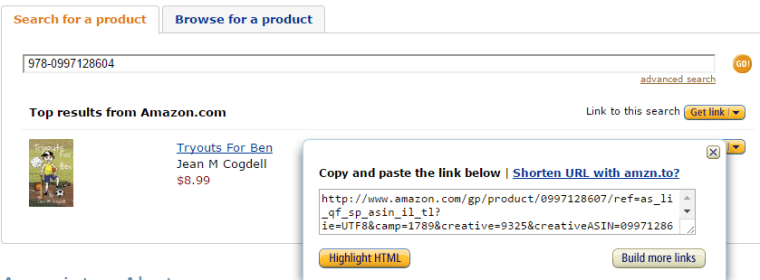
1- After you’ve found the product, click on “Shorten URL witamzn.to?” above the HTML code.

This gives you a short URL link that you can copy and link to any image.

screenshot_Wed_Jan_20_11.38.21

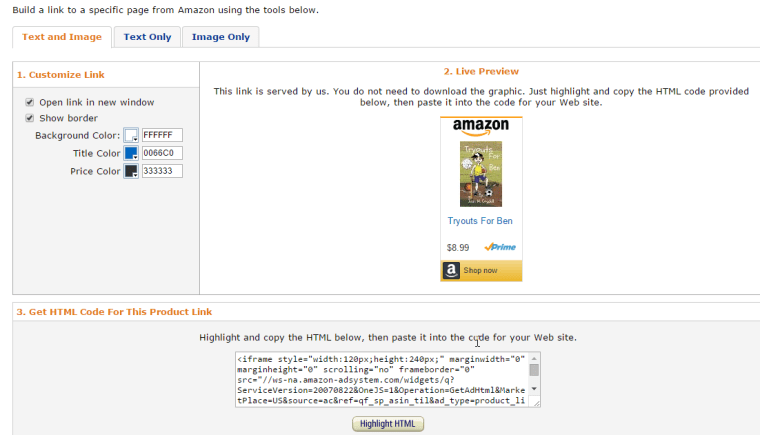
2- Click on the “Build more links” button on the right below the HTML code. 

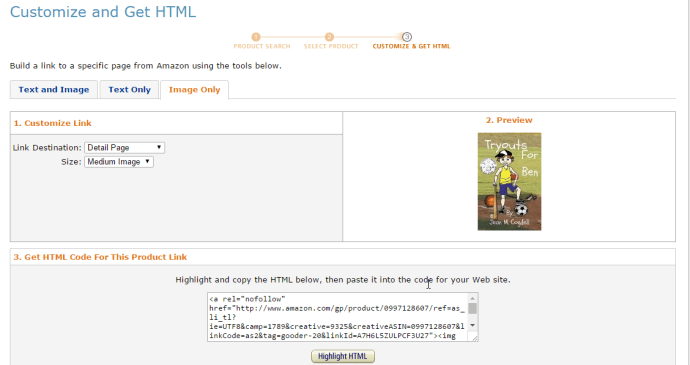
This takes you to the screen below where you can select from 3 different customized links, Text only, Image with Text, or Image only.

screenshot_Wed_Jan_20_11.59.57

I like the image only, as it will give you a widget you can use on your website. That’s the one I have on the upper top left of this website. 

screenshot_Wed_Jan_20_11.45.50

3- Select one of the 3 and click Highlight HTML and copy.

4- Paste the HTML code in the widget you want to use on your website.

Now go sign up on Amazon Associates. 

Hope my tips were as helpful as Ana’s. If they were, or if you’ve had good success on Amazon Associates, let me know in the comments. I’d love to hear from you.

You can find me on Twitter @jeancogdell, Facebook at jean.cogdell and Amazon.com, stop by and say hey! Please remember to with a click and share this post with your Twitter peeps and Facebook fans.