Choosing a Genre—Anatomy of a Best-Selling Story Part 7

How serendipitous (I know-big word) the timing. I don’t believe I could have ordered a better follow-up for my last post. Thank you Kristen, I know my readers will enjoy your latest post at Warrior Writers.


I love comments, tell me what’s happening with you and if you’re not already, please follow me @jeancogdell on Twitter or jean.cogdell on Facebook!

Author Kristen Lamb's avatarKristen Lamb's Blog

Screen Shot 2014-07-30 at 10.42.33 AMUnderstanding structure helps us write cleaner and faster. Whether we plan every detail ahead of time or just intuitively have the architecture in our head, structure makes the difference between a workable first draft and a nightmare beyond salvage.

I know a lot of you are chomping at the bit right now to get writing. All in due time. Today we are going to talk genre and why it is important to pick one.

Understanding what genre you are writing will help guide you when it comes to plotting your novel. How? Each genre has its own set of general rules and expectations. 

If we don’t pick or we get too weird, we will confuse agents and readers because there is no clear idea of where this sucker should be shelved. It will also make plotting more than problematic.

Fifteen years ago, when I first got this brilliant idea to…

View original post 2,601 more words

Wonder why your writing submissions suck?

Are you too picky? Aim too high? Or just too timid?

Becky Tuch gives 8 reasons why.

Looking for a place to submit your story?

Check out the Call for Submissions at NewPages

Then read articles like the one from Lynne Barrett  where she explains what editors want.

Remember even if you write the perfect story, it may not be perfect for the editor reading your submission. Take heart and keep submitting.

I love comments, tell me what’s happening with you and if you’re not already, please follow me @jeancogdell on Twitter or jean.cogdell on Facebook!

Do you need a little push to finish writing that book?

How about $2000.00?

And a book contract?

Is your WIP still languishing half-finished in a drawer or file?English: W.I.P.

Maybe this contest is just the incentive you need to finish that book and get a publishing deal.

The Write Life sent out information about a no fee, contest called Publish or Perish.

Deadline August 15, 2015.

So this summer, finish that manuscript and polish it till that thing shines like a brand new penny. Then put together a killer marketing plan and head over to Publish or Perish and enter their latest contest.

Sounds so exciting right?

Do you know of another contest?

If so share the info in the comments section and let’s get writing.

I love comments, tell me what’s happening with you and if you’re not already, please follow @jeancogdell on Twitter or jean.cogdell on Facebook!

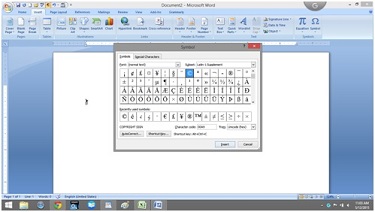
Hunting for symbols?

I use Scrivener and MS Word for my writing.

Don’t ask why, I’m just weird that way. However, Sometimes my writing flow is interrupted when I can’t remember the shortcut key for a specific symbol.

Searching through the Insert Symbol tab is like coming to a stop sign.msword

To ease my irritation a little, I made a cheat sheet and thought I’d share.

So if you are tired of searching for just the right symbol as if you’re looking for a matching pair of socks in a drawer that won’t close. Hope this helps.

Shortcut keys for symbols

Ctrl+Alt em dash
Ctrl+W Close the active window / document.
Ctrl+Z Undo an action.
Ctrl+Y Redo the last action or repeat an action.
Ctrl+S Save a document.
Ctrl+P Print a document.
Ctrl+K Insert a hyperlink.
Alt+Left Arrow Go back one page.
Alt+Right Arrow Go forward one page.
Ctrl+C Copy selected text or graphics to the Office Clipboard.
Ctrl+V Paste the most recent addition to the Office Clipboard.
Ctrl+Shift+A Format all letters as capitals.
Ctrl+B Applies or removes bold formatting.
Ctrl+I Applies or removes italic formatting.
Ctrl+= Apply subscript formatting (automatic spacing).
Alt, F, A Save As.
Alt, S, T, I Insert Table of Contents.
Alt, S, T, R Remove Table of Contents.
Alt, W, F Full Screen Reading – View > Document Views > Full Screen Reading.
Alt, W, R Ruler. View > Show/Hide > Ruler.
Alt, F, X  Exit Word.

For less commonly used keyboard combinations check out this website:

http://www.internet4classrooms.com/msword_keyboard_ibm.htm

For more Alt symbol codes go to:

http://www.alt-codes.net/

I love comments, tell me what’s happening with you and if you’re not already, please follow @jeancogdell on Twitter!