Do you think more tools make a better writer?

At some point I think we have to settle on one or two and just write.

What about you?

Each week it seems as if I’m finding more and more apps and programs for writers/bloggers. But downloading and using the latest and greatest can become more confusing than easier. At least for me.

At what point are we just reinventing the wheel?

Here’s my take on the 5 I found this week in a recent article on Business.com,  Posted By . These tools are supposed to help the writer/blogger write better and faster.

You be the judge.

The first one listed is an app called Help Me Write.

This is a web-based app to help you decide what to write next.

  • You write your ideas on a profile page.
  • Next, share via Twitter, Facebook, blog (or wherever) and ask your networks, which or if, they would like to read.
  • Pick the idea with the most interest and write an article, post or story, then send directly to all the voters.

For a regular blogger this is supposed to get readers more engaged with your brand and writing process. For example, you could write a weekly post “ask the audience” post, or get readers to vote on a special project.

Me- I’ll pass. I don’t need another platform to keep up with.

Second on his list was MyBlogU.

This appears to be a brainstorming, community gathering, idea and information generating platform. Whew! That was a mouthful. Here, a writer/blogger can gather information from experts and other writers, enabling you to learn as you go.

MyBLogU concept

Me- I’ll pass on MyBlogU. Once again this crowdsourcing platform seems as if it would take more time than I’ve got to give.

The Hemingway App was #Three.

This is a desktop app I’ve used and like.

Mainly for the readability feature. I can see in a second the readability level of my writing. It will also highlight which sentences are hard to read, complex or simple. Hemingway Editor doesn’t take a lot of time and is super easy to use.

Hemingway

Me- I’ll continue to use Hemingway Editor.

RobotDon is number four.

This web driven app has a lot of useful tools and is simple to use. However, I think the Plagiarism check in Grammarly works better than RobotDon. If you already have a program that helps you with all of these items you might want to pass.
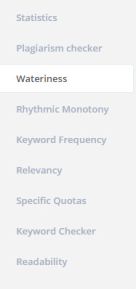
Robotdon

Me- I’ll pass on RobotDon and continue to use Grammarly. In this instance, “you get what you pay for” is true.

Twords was number five and last in the article.

This is an online app that nudges you to write. You list goals and the app community will remind you if you are falling behind. It provides stats, timed writing and prompts should you get stuck.twords
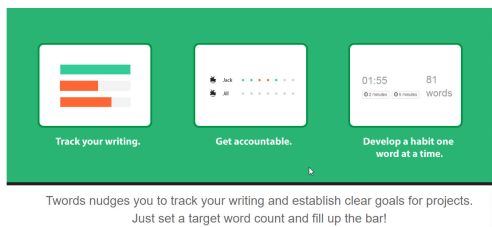
Me- I’ll pass on Twords. This looks fun but distracting. I use Scrivener for stats and my progress details.

If you want to read the entire article By  and his take is on these 5 writing tools click on the link below at the bottom of this post.

Okay, tell me– Do you have enough writing apps?

Do you think they are all becoming redundant?

I’d love to hear from you! Click the “write me” tab or contact me on Twitter @jeancogdell, Facebook at jean.cogdell and Amazon.com, stop by and say hey! The lights are on and I’m waiting.

Please remember to share this post with your Twitter  peeps and Facebook fans.

Creating Killer Content: 5 Easy to Use Tools for Better Writing in Less Time

Keep the tips coming! You guys are the best!

Being a writer is like working as Ring Master in a circus. Have to know how to juggle, keep the show moving and shovel elephant poo. So many jobs, so much to do and learn.

circus-828680_640

Staying ahead of the new gadgets and media stuff would be overwhelming without this community of writers. I can always count on y’all to step up, share and help with great tips.

Thanks for todays tip goes all the way to balmy Ohio and Jena Henry, a cool author, book reviewer and one of my fav readers who keeps me encouraged.

After reading my post on how to embed “Instant Book Preview” of your book on your website, and other social media sites, Jena stepped forward and clued me in on how to take it a step further.

Now you can click the “Share symbol” on your Kindle and send not only a quote, but an Instant Preview to a friend or the world. This is so cool because my sister and I were discussing a book earlier this week. Instead of trying to remember or explain what I thought was so great, I could’ve just shared a quote and an instant preview with her.

That’s right! Amazon has made sharing books you enjoy easier and faster.

However, I was disappointed to find my old Kindle Paperwhite (very first Paperwhite) doesn’t send an the instant preview, just the quote. Plus, it only sends the quotes to Facebook, Goodreads, and Twitter.frog-sad

Maybe time to buy a newer version of Kindle e-reader. Well-played Amazon, well-played. frog-happy

The good news is that it works on Android apps and on the newer Kindles (I just sent an Instant Preview from the Kindle app on my iPhone, pretty slick.)

Jena was reading on her Kindle Voyager when she discovered the “share” symbol. And when she hit the symbol a preview link shows up with a photo of the book and the reader receives a free preview. And she could continue reading!

What do you think?

Another tool to promote your book as well as other writers?

I’d love to hear from you! Click to write me or contact me on Twitter @jeancogdell, Facebook at  jean.cogdell and Amazon.com, stop by and say hey! The lights are on and I’m waiting.

Go check out Jena’s website The Golden Age of Charli and tell her Jean sent you.

Please remember to share this post with your Twitter peeps and Facebook Facebook fans.

Read more about this new “Share Instant Preview” at the links below.

Great Books, Great Conversation

Amazon upgrades Kindle quote sharing with Instant Previews BY  

AMAZON’S NEW INSTANT PREVIEW FEATURE SHARES THE PERFECT QUOTE AND A PREVIEW OF THE KINDLE EBOOK By

Do you want to add one more to your tool bag?

One more social media tool?

Are you ready to go live with Blab?

Now that you’ve stopped laughing, I’m serious. It’s called BLAB. Yeah, it’s new to me too.

blab 1

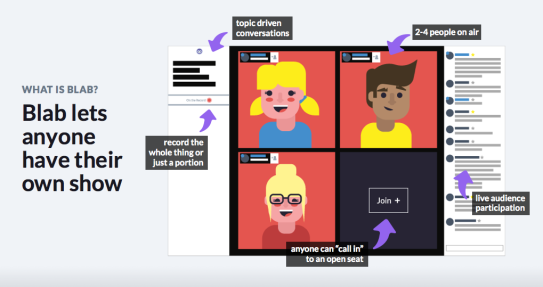
If I understand it, BLAB works a little like an interactive YouTube.

blab 2

But this is a place you can listen, watch and ask questions live. Get that burning question from a writer, or maybe someone with a speciality you need for your book answered. Now there’s an idea.

One thing! If you decide to participate, check your background. Hide the dirty dishes, and turn down the music. Or, and in my case, I will need to put on a little makeup, most days I don’t wear any. When I’m writing my characters don’t care.

Ways a Writer Can Use Blab

  1. Use the search feature and find other authors and learn about writing and publishing.
  2. Follow your favorites and receive notification when they schedule new Blabs.
  3. Network with other authors.
  4. Discover topics on self-publishing, editing, book covers, agents, sales, and marketing.
  5. Find readers interested in your books.

For more information about using BLAB read–

Book Marketing: How, Why and When to Use Blab – and What is Blab, Anyway? by

What do you think?

Is this a new tool you will use?

Or is this another time sucker?

I’d love to hear from you! Click to write me or contact me on Twitter @jeancogdell, Facebook at  jean.cogdell and Amazon.com, stop by and say hey! The lights are on and I’m waiting.

Please remember share this post with your Twitter peeps and Facebook fans.

 

Do you want to know a secret?

I blog about things I want to remember.

elephant-1090834_640

Yep! Sharing with you is the best way I know to squirrel away nuggets of wisdom so that I won’t forget them.

squirrel-453722_640

If I didn’t talk or write about stuff, I’d forget and forget quickly. So y’all are the lucky ones, or unlucky, that get to hear all about my aha moments. Even if I’m a day late to the party. Which today may be the case. LOL

But, still, I’m excited about the information I discovered in Kristina Stanley‘s latest blog post!

Instant Book Previews Via Amazon. Very Cool!

Here is how it works

Kindle instant previews can be embedded on the web or shared as a link via email, text and other favorite apps. Anyone can start reading the preview for free by clicking on the link, just like this example. The Kindle instant preview provides:

  • Free content to keep traffic on your site
  • Free access to a sample of the book
  • Adjustable font sizes for the readers’ comfort
  • Direct link to book purchase from Amazon
  • Download link to get the free Kindle app

Until now, I had no idea how to set up the instant previews for an ebook.

It as easy as 1 – 2 – 3. No download or app to install! Took me about 5 seconds! Wow!!!

And guess what?

You can even use the link on Twitter! 

Thank you Kristina!

If you’d like to add a free preview for your ebook to your website or twitter go to one of the links below.

For  (U.S.)
For (U.K.)
For (Australia)
For (Canada)
For (India)

Are you already using the FREE Preview for your ebooks?

Is this new to you too?

What do you think about it?

Click on my book image below and see how it works!

I’d love to hear from you! Click to write me or contact me on Twitter @jeancogdell, Facebook at  jean.cogdell and Amazon.com, stop by and say hey! The lights are on and I’m waiting.

Please remember share this post with your Twitter peeps and Facebook fans.

Twitter ad 01