I use Scrivener and MS Word for my writing.
Don’t ask why, I’m just weird that way. However, Sometimes my writing flow is interrupted when I can’t remember the shortcut key for a specific symbol.
Searching through the Insert Symbol tab is like coming to a stop sign.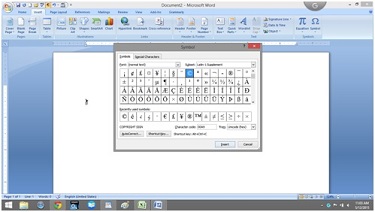
 To ease my irritation a little, I made a cheat sheet and thought I’d share.
So if you are tired of searching for just the right symbol as if you’re looking for a matching pair of socks in a drawer that won’t close. Hope this helps.
Shortcut keys for symbols
| Ctrl+Alt |
em dash |
| Ctrl+W |
Close the active window / document. |
| Ctrl+Z |
Undo an action. |
| Ctrl+Y |
Redo the last action or repeat an action. |
| Ctrl+S |
Save a document. |
| Ctrl+P |
Print a document. |
| Ctrl+K |
Insert a hyperlink. |
| Alt+Left |
Arrow Go back one page. |
| Alt+Right |
Arrow Go forward one page. |
| Ctrl+C |
Copy selected text or graphics to the Office Clipboard. |
| Ctrl+V |
Paste the most recent addition to the Office Clipboard. |
| Ctrl+Shift+A |
Format all letters as capitals. |
| Ctrl+B |
Applies or removes bold formatting. |
| Ctrl+I |
Applies or removes italic formatting. |
| Ctrl+= |
Apply subscript formatting (automatic spacing). |
| Alt, F, A |
Save As. |
| Alt, S, T, I |
Insert Table of Contents. |
| Alt, S, T, R |
Remove Table of Contents. |
| Alt, W, F |
Full Screen Reading – View > Document Views > Full Screen Reading. |
| Alt, W, R |
Ruler. View > Show/Hide > Ruler. |
| Alt, F, X |
Exit Word. |
For less commonly used keyboard combinations check out this website:
http://www.internet4classrooms.com/msword_keyboard_ibm.htm
For more Alt symbol codes go to:
http://www.alt-codes.net/
I love comments, tell me what’s happening with you and if you’re not already, please follow @jeancogdell on Twitter!



 Jean's Writing