Do you know how to use Google forms?

You might be surprised how handy these forms will come in.

I haven’t built up an email list. I know, I just heard every successful author and blogger out there groan. Like you, I’ve read how important a list can be to stay in touch with readers.

However, I’m not ready to sign up with a service like MailChimp yet. And I’ve got enough on my plate what with the blog and my little sideline called writing.

This is where Google forms come in.

Need to send out a quick request for info, make a form and send it to friends, families, attach it to your blog, Facebook page or Tweet it out.

You can make all types of custom forms to meet whatever info you need.

Like this form, I made, asking for readers to review my little 32-page children’s picture book. She’s making her debut next week.

If you’d be willing to do a quick review for me click on the book cover below.
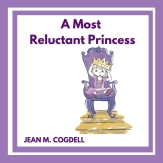
a 9 canva cover square front

Want to make your own form? To collect emails, send out announcements or whatever?

Just go to Google Forms and get started! It’s easy.

There are templates for party invites, registrations, sign-up sheets, evaluations and more!

Here is a tutorial to help you get started.

So tell me…

How do you gather information?

Do you use forms or a service like MailChimp?

Talk to me, the lights on and comments are now open.

You can find me on Twitter @jeancogdell, Facebook at jean.cogdelland Amazon.com, stop by and say hey! Please remember to click and share this post with your Twitter peeps and Facebook fans.

How to sell your book with a target audience

On this subject, I’m totally clueless.

There I said it. They say the first step to recovery is admitting you have a problem. Well, I don’t know about you, but this is a problem for me.

I’ve never been good at the sell!

book_sale

One thing I’ve learned through this process. Targeting an audience begins with the title of your book. This is something I didn’t realize until now.

I’ve now discovered the audience for my upcoming book is preschoolers. That means my target audience is their parents or grandparents. Right? Because preschoolers can’t order books on Amazon at least not without a little help.

So, what’s next? I can’t lurk in the parking lot at Tiny Tot’s Preschool as parents drop off their kids. That might get me a lot of publicity but not exactly the type I need.

Step 1- my target audience:

  • Moms, Dads, and Grandparents
  • Little girls with big imaginations
  • Ages 1-5

Step 2 – where they hang out:

  • Facebook
  • Twitter
  • Pinterest
  • Online publications
  • Local Libary

Now what?

Y’all have any suggestions?

Talk to me, the lights on and comments are now open.

Keep reading great links at the bottom of the page!

You can find me on Twitter @jeancogdell, Facebook at jean.cogdelland Amazon.com, stop by and say hey! Please remember to click and share this post with your Twitter peeps and Facebook fans.

Do You Waste Time Marketing Your Book To The Wrong Readers? by

5 Tips on How to Identify Your Target Audience  by

How To Target an Audience (And Avoid Book Launch Flop) by

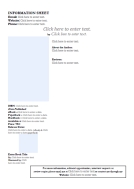
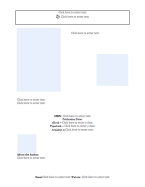
Here are the Free, Info Templates I promised

Not one, but two!

Two templates for you to use.

Just fill in the blanks of the Author Information Sheets located at the bottom.

But first I wanted to share with you the ones I’ve been working on for my book.

A local Author Con is coming up in May and I’ve been busy working on some AI Sheets for my book. I like the Sheet 2 best, although the Sheet 1 contains more information. I’m not sure more is always better.

What do you guys think?

AI Sheet
Sheet 1
Ben sheet 2
Sheet 2

With these templates you can make your very own customized AI Sheet. For the basics, I’ve made it a simple click and fill in the form type of templates. But you should be able to adjust these templates by adding or deleting information to make them more personal for your book.

Now go forth and have some creative fun. And do let me see some beautiful flyers!

Just click on the thumbnails and download. (Fingers crossed this works!)

AI 1          AI 2

You can find me on Twitter @jeancogdell, Facebook at jean.cogdell and Amazon.com, stop by and say hey! Please remember to with a click and share this post with your Twitter peeps and Facebook fans.

Sometimes the easiest is the most direct

Like, use what is right in front of me. There’s not a long learning curve with a program I already know. Duh!

This appears to be a lesson I seem destined to learn the hard way over and over.

After spending all day, and I do mean all day, researching and downloading various programs I figured out what I’d been using was the best all along. Go back to the tried and true. 

All that time wasted. Sometimes I’m so hard-headed. 

Me- Duh Jean M Cogdell

However, one good thing did come out of it. 

I came across a valuable post filled with information. Information that I did need. 

Do you know how many pages a children’s picture book should have? 

Do you know how it should be constructed? Exactly? Dough boy - building crane JeansWriting.com

Picture Book Dummy, Picture Book Construction: Know Your Layout by Tara Lazar

You see, my editor had just suggested I make up a dummy of my new children’s book before going in further. She thought a dummy might help me get a handle on the correct size of the book and the illustrations.

So I guess my day wasn’t wasted after all. 

Thanks, Ms. Lazar for this timely bit of info. With your post maybe I’ll avoid a lot of mistakes.

Now this dummy is off to lay out a dummy of

“A Most Reluctant Princess.”

Throne Screen Shot 2016-01-16 at 9.22.25 PM - Copy

I hope some of y’all find the information as helpful as I did. If you did, talk to me…

You can find me on Twitter @jeancogdell, Facebook at jean.cogdell and Amazon.com, stop by and say hey! Please remember to with a click and share this post with your Twitter peeps and Facebook fans.