How to select the picture you want for your post

Are you frustrated with Facebook?

Irritated every time you click the share button and Facebook chooses the wrong picture to post?

Me too!

What’s this all about? Apparently, from what I’ve been able to find out, Facebook controls this in an effort to stop people from changing legit articles by adding fake pictures.

Huh?

I don’t know about you but I’m tired of the same picture posting every time I click share. So, I’ve discovered a workaround. Well, works most of the time.

Instead of clicking on the share button, try this.

  • First copy your post address. (  https://      )
  • Open your Facebook page.
  • Paste the post address in Facebook.

The link should show default picture with arrows so you can select a different image.

If this doesn’t work, you may need to SCRAPE/DEBUG your Facebook. 

Click on this link – FACEBOOK DEBUG

After you click the Debug Button go a little lower and SCRAPE  your website.

Click the SCRAPE AGAIN button and this clears the default image from your Facebook.

Let me know if this has helped. Even if you don’t post a lot on Facebook you still may want to Debug/Scrape your website. Just another part of website housecleaning.

Me Let's Discuss - Jeanswriting.comDid this change anything?

Have you ever used the Debug on Facebook?

Did I confuse you more? I hope not.


PLEASE FOLLOW ME ON SOCIAL MEDIA BY CLICKING ON THE LINKS BELOW. STOP BY ANYTIME, I’LL LEAVE A LIGHT ON. 

FacebookTwitterAmazonPinterestStumbleupon


What you need to know about writing a children’s book?

Wow! Two years have passed.

Yes, it was two years ago this April, I finished the final touches on my first pre-school picture book.

Writing and publishing a picture book was a big learning curve.

Took me a year to finish this tiny 32-page book. Whew!

Maybe you have an idea for a children’s book, but like so many, you’ve put off starting because a picture book is a bit different from writing an adult story.

Let me speed you along toward your goal.

I’ve put together a list of 8 things I learned the hard way about writing a picture book.

  1. Buy a good PDF program. Yes, some people use MS Word but, trust me, it’s not worth the headaches. I finally settled on  Nitro Pro 10 Page Plus. It’s cheaper than Adobe and easy to use.
  2. Writers write and editors edit. Use an editor that understands children’s books. Yes, even small 32-page picture books need an editor. I found a great one by just asking around. LinkedIn and Facebook Groups are great resources. I found a wonderful editor, Margaret Welwood.
  3. Unless you can really draw, I can’t, find a good illustrator. Ask around. See #2.
  4. Decide on the size of your book. Go to the bookstore and library, look at other books for similar to your book. Me, I went with 8.5 x 8.5. Not too big or not too small for little hands.
  5. Download a photo editing program, I used Paint.NET, to help size the illustrations. Adobe will work too.
  6. Purchase an ISBN. That will help your books get into libraries.Who doesn’t want that, right? You can use the same number for IngramSpark and Amazon publishing.
  7. Use the cover templates provided by IngramSpark and Amazon or whichever publisher you decide. Each template is different.
  8. Order proof copies before you finalize and publish. Hard lesson.

My tips don’t apply to an ebook. No, this post is about producing a print picture book.

Me Let's Discuss - Jeanswriting.comDo you want to write a picture book?

Have you written one already? Do share your tips.

Did I answer some of your questions?


Want more? Click and read…

A Story Board

Free Picture Book Thumbnail Templates for Writers and Illustrators

Picture Book Dummy, Picture Book Construction: Know Your Layout

Picture book layout templates

PLEASE FOLLOW ME ON SOCIAL MEDIA BY CLICKING ON THE LINKS BELOW. STOP BY ANYTIME, I’LL LEAVE A LIGHT ON. 

FacebookTwitterAmazonPinterestStumbleupon

How you can make the most of Social Media

Want to sell more books, grab more readers? 

Who doesn’t, right?

Just had to reblog this terrific post by  His article is filled with great tips on how to promote your book through social media.

I haven’t tried all of his tips, but I’m working on them. Little by little, and page by page, I’m trying to improve my social media presence.

Fingers crossed I don’t screw up my Facebook page. I’ve been known to mess up in the past.


If any of y’all manage his instructions, do let me know how it works out.

Exciting Times For Facebook Author Pages By 

Have you maximized your presence on Facebook and other Social Media?

Which tip worked best for you?

Do have another tip to help me expand my presence on Social Media?


I HOPE YOU TAKE A MINUTE AND FOLLOW ME ON SOCIAL MEDIA, JUST CLICK ON THE LINKS BELOW. I’LL LEAVE A LIGHT ON.

FacebookTwitterAmazonPinterestStumbleupon

Which social media sends you the most readers?

Is WordPress Reader, Google, Pinterest, Facebook, Instagram, Flipboard, or Twitter the best choice?

Or how about Reddit, StumbleUpon, Medium, or a market I’ve yet to discover? Seems a new one pops up every day. So how do we discover which is best for our blog?

Do you have a favorite you search engine? 

Okay, Bloggers hold on to your hat! Deep diving for answers today. 

All of these questions were rolling around in my head this past weekend and got me to thinking…

Am I wasting my time on the wrong platforms? Should I concentrate on just one or two and not spread myself like mayonnaise on bread.

Time for research. Which translates into dropping down the ole rabbit hole.

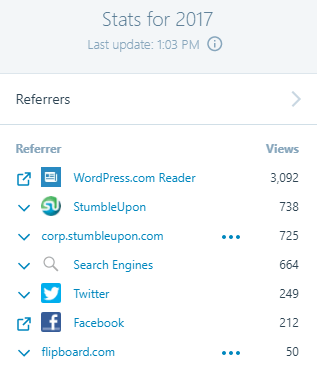
The first place I started, of course, was the Stats page in WordPress. But that was just a starting point. You can see from my image, according to WordPress, most of my referrers come from WordPress Readers.

But, does that tell me how readers actually discovered Jean’s Writing? I’m not sure. The term “referrer” is referencing online sources – specifically sites or services that the referring page or link clicked on to get to my site. Clear as mud, right?

Look at this section on your STATS page to get a better idea of how many people are seeing your blog.  Below is how many views, visitors, likes and comments made to my blog.

However, that still doesn’t let me know which social media gets me the most bang for my time.

So, I did a little more digging.

Another great source is Google Analytics. Takes a little while to set it up but once you do you can see which social site is sending the most people to your website. I set up my account last year but hadn’t checked on it since. So, I headed over to see what was what.

Holy Cow! Google Analytics had zero stats for my website. Please don’t judge me too harshly. Because I’m embarrassed to tell you, I’d forgotten one very important step. The freaking Accept button. You know that button that says you agree to terms, yadda, yadda yadda…  


So y’all tell me…

How do you figure out all this stuff?

Or do you just go with the flow and not worry about who or how?

Do you concentrate on one social media outlet more than another?

Which social media do you think helps your blog the best?

Want to read more about which social media is sending visitors to your website? Click on the links below.

Who is Driving Visits to Your Site

What social media channels drive the most traffic to your website?

WordPress Stats

How to See Which Social Media Platforms Are Sending You the Most Traffic

I HOPE YOU’LL TAKE A MINUTE TO FOLLOW ME ON SOCIAL MEDIA, JUST CLICK ON THE BUTTONS BELOW. I’LL LEAVE A LIGHT ON.