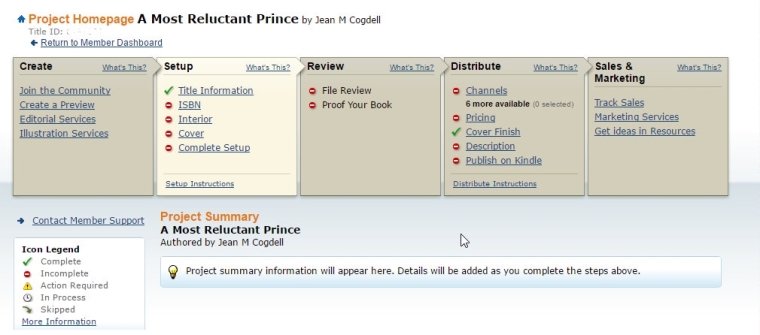
As promised, here are the tools I selected for my books

I use two.

IngramSpark/Lightening Source and Createspace for my print books

Amazon KDP for the e-book.

IngramSpark Print Distributes to brick and mortar retailers, bookstores and libraries file.  If you ever hope to put a print book in a bookstore or at your local library this is where you want to be. Accepted for download is only PDF. E-Book Distribution to online e-retailers but accepted download only epub. IngramSpark does NOT provide free ISBNs. Customer service is very responsive and helpful.

Createspace has very easy to use with the step-by-step instructions. You can upload your work as a print-ready .pdf, .doc, .docx, or .rtf. Your page count will be detected and an automated print check will run once your upload is complete. You’ll be able to see any issues online using the Interior Reviewer tool. Createspace does provide free ISBN or you can use your own.

Another plus is that should you choose, you can let Createspace convert and send to KDP for ebook publication.
createspace

One note: I prefer to purchase and use my own ISBN. Yes, this does add cost but also gives me a little bit more control.

So how to you convert and publish your books? Print and e-book?

Do you do conversions using third-party tools or do you let the printer tools available on their websites?

Talk to us in the comments. Or click the “write me” tab or contact me on Twitter @jeancogdell, Facebook at jean.cogdell and Amazon.com, stop by and say hey! The lights are on and I’m waiting.

Please remember to share this post with your Twitter  peeps andFacebook fans.

How to select the best ebook conversion tool

Too many choices!

But fortunately, there is one that will work for you.

And thanks to 

So if you’re ready to convert and upload that best-selling book, keep reading.

Amazon KDP

KDP accepts ePub, Word doc/docx, HTML, mobi formats. Output mobi, and HTML.  In my book Tryouts for Ben, I uploaded a Word docx and had little trouble. I agree with David; it’s easy and almost fool-proof.  Don’t waste your time using fancy fonts, or formatting, because KDP will not recognize most of them. However, if you are confident with HTML, and CSS format, you can edit the converted file in HTML.

Barnes and Noble Nookbook

I’ve not converted any of my books to Nookbook. But David assures us it’s fairly straightforward. But doesn’t allow for HTML editing.

KOBO

Again, I’ve not yet used KOBO. It appears to be less than user-friendly and not sure I’ll bother with it. David didn’t appear to be impressed.

DRAFT2DIGITAL (D2D)

D2D accepts ePub, Word doc/docx, RTF files, and the output is ePub, mobi, or PDF. I did consider D2D but wasn’t happy with their conversion tool.

SMASHWORDS

Smashwords accepts files in ePub, Word doc (not docx.) Note: this means you must save your manuscript in the older version of Word.  Out put is impressive: ePub, mobi, PDF, PDB, lit, TXT, and many more. Again, this is one I considered but decided it wasn’t for me.

So which tool did I use?

computer-frogs 2

Check back tomorrow.

But in the meantime, head over and read David’s entire article.

The Convertible Cloud: Ebook Conversion Online

Click the “write me” tab or contact me onTwitter @jeancogdell, Facebook at jean.cogdell and Amazon.com, stop by and say hey! The lights are on and I’m waiting.

Please remember to share this post with your Twitter  peeps andFacebook fans.

How to avoid the dreaded over 140 warnings

Yes, we all get the red warning from time to time. 

screenshot_Fri_Jul_08_10.11.00

Within Tweetdeck or Twitter, I use bitly  to automatically shorten my links. But, there are several to choose from such as Ow.ly, or TinyURL.com, all you need to do is to search for one that will work for you.

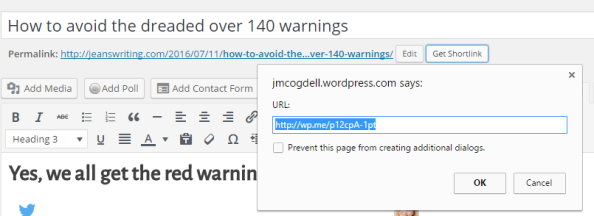
Everyone knows how to shorten your own post within WordPress. Use the Get Shortlink button!

screenshot_Fri_Jul_08_10.49.44

But how do you shorten a link that is not yours?

What do you do when you want to share a link plus add comments?

I use goo.gl URL Shortener which is an add-on to my toolbar. Here is a few of features for the Google shortener add-on.

► Features
  • Official goo.gl API support
  • Official goo.gl history/dashboard support with OAuth
  • Auto copy to clipboard
  • Keyboard shortcut
  • Context menu
  • QR Code
  • Highly customizable
  • Incognito mode
  • Share with your default mail client
  • Share with many different services 100zakladok, AOL Mail, Baidu, Bebo, Blip, Blogger, Bobrdobr, Delicious, Diaspora*, Digg, Diigo, Evernote, Facebook, Formspring, FriendFeed, Friendster, Gmail, Google Bookmarks, Google+, Hatena, Hyves, Hotmail, Identi.ca, Instapaper, iWiW, Lifestream, LinkedIn, LiveJournal, Mail, Mail.ru, meinVZ, Menéame, Mister Wong, Multiply, MySpace, Netlog, NUjij, OKNOtizie, Orkut, Oyyla, Ping.fm, Plaxo, Plurk, Pocket, Reddit, Segnalo, Sina Weibo, Sonico, Springpad, studiVZ, StumbleUpon, Technorati, Tuenti, Tumblr, Twitter, TwitThat, TwitThis, Viadeo, VKontakte, Wykop, XING, Yahoo! Bookmarks, Mail, Yammer

(Hate to admit this but I’ve never heard of some of these.)frog-sad

Don’t want an add-on? 

Well, Google may still be the site for you.

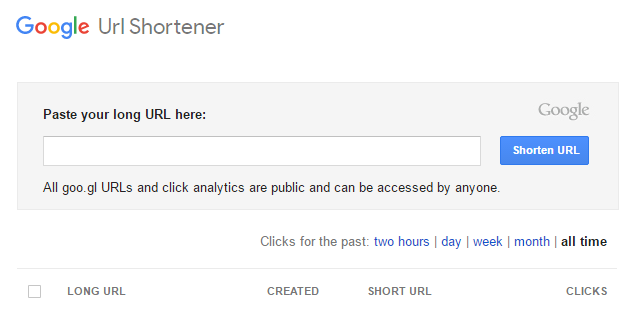
Just head over to the Google URL Shortener web page. Bookmark this page and use it to shorten the links. Super simple.

screenshot_google

Have you ever failed to share because the link is too big?

Do you think using one of these will make it easier to share?

Do you already use a link shortener? Which one do you like best?

Talk to me in the comments section, I’d love to hear from you! You can also click the “write me” tab or contact me onTwitter @jeancogdell, Facebook at jean.cogdell and Amazon.com, stop by and say hey! The lights are on and I’m waiting.

Please remember to share this post with your Twitter  peeps andFacebook fans.

Do you know how to give away your book for FREE?

Well, I didn’t either until today.

Free-download-300px

Kindle Edition : “free kindle books”

But a big thanks goes out to fellow bloggers the big Ape and   for sending out much-needed information. A post – Molly Greene’s Advice on Going Permafree on Amazon.

Most of us have a WIP and one day may want to make it FREE for a day. But if you’re like me the process has baffled me.

A short while back, my friend Charles E. Yallowitz decided to make the first book of his fantasy Legends of Windemere series permafree. This is something I’ve been considering myself, but I&#… Continue reading

Source: Molly Greene’s Advice on Going Permafree on Amazon

Molly discovered the process when she wanted to make Mark of the Loon free.

Here is a breakdown of the steps:

  • Log into Kindle Direct Publishing (KDP).
  • Click the “Help” tab in the upper right-hand corner.
  • On the left menu, scroll to the bottom and click “Contact us.”
  • Again, left menu, click “Getting Started.”
  • Then click “Pricing Your Book.” (One of the “Answers to common questions” options under this category is “what is price matching.” That link will take you to Amazon’s policy page.)
  • Under “ask your question here,” use the subject line: Price Matching. In the body of the message, include the title and ASIN of the book, plus links to retail sites where it is currently free: iTunes, Kobo, Smashwords, whatever. Tell them you’re running a free promo and you need Amazon to price match.

The NEW Easy Way To Go FREE On Amazon  by Molly Greene @mollygreene

Now I don’t know about you but this seems all a bit convoluted. Before long I expect a few more hurdles will be added, such as:

  • Use starter pistol at “Starting Point”
  • Hop on one foot as you log on
  • Scream bloody murder when clicking on “help” key

So what do y’all think?

Have you succeeded in offering a book for FREE?

Will you in the future?

I’d love to hear from you! Click the “write me” tab or contact me on Twitter @jeancogdell, Facebook at jean.cogdell and Amazon.com, stop by and say hey! The lights are on and I’m waiting.

Please remember to share this post with your Twitter peeps and Facebook fans.