Are you searching for a new look too?

Well, I was and I hope you like my new look. Before you get started, let me tell you it took a lot of work.work frog-1339892_640

But a big thank you goes to writer and blogger who just happens to be my sister, Sheila Good, for her suggestions. After several hours, and lots of swearing, I got it done without destroying my original blog.

If you’re thinking of changing your look, here are a few tips that might help.

  • First, start a new website with a different name of course and made it private.

This private website is your testing ground. Private means no one can see it but you. You can manipulate it, change the theme and just have fun until you get the right look without destroying your original blog.

  • How do you know if a theme has a page that will work for landing?

There are websites on WordPress.com that have multiple pages. This is why it’s important to play with different themes. Once you find a theme, go to Pages – Add New Page and click on Page Attributes. (this box is usually on the far right.) page attributes
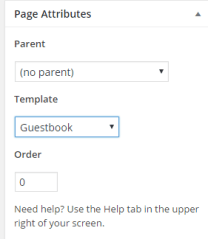
Under Template, there will be choices. Default or as in mine Guestbook. Other themes templates are named differently. If there are no multiple templates, time to try another theme.


  • Next, go to Appearance, Customize and select Static Front Page option. static pageThere you can  select which page you want as your landing page.
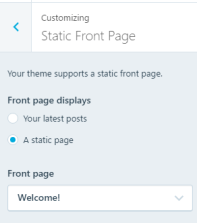
 

I hope this is a little clearer than mud, and it helps you find just the right theme for your website.

But, remember to make a different website for your experiments.  

Now it’s your turn. 

How did you select your blog theme?

Any suggestions to make it easier for others?

Keep Reading – 

Click on the articles at the end of post to read what other bloggers have to say about finding the right theme.

I’D LOVE TO HEAR FROM YOU! CLICK TO WRITE ME OR CONTACT ME ON TWITTER @JEANCOGDELL, FACEBOOK AT JEAN.COGDELLAND AMAZON.COM, STOP BY AND SAY HEY! THE LIGHTS ARE ON AND I’M WAITING.
PLEASE REMEMBER, SHARE THIS POST WITH YOUR TWITTER PEEPS ANDFACEBOOK FANS.


Find the best WordPress themes (free or paid) 
SELECTING THE PERFECT WORDPRESS THEME – 9 THINGS YOU SHOULD CONSIDER
HOW TO CHOOSE THE RIGHT WORDPRESS THEME FOR YOUR WEBSITE

Don’t you just love it, when you “get it”?

Me too!

Thanks to J.A. Stinger for sending me to a new blogger, at least new to me, for another light bulb moment.

I’ve been a member of Amazon Associates for years. I’ve never understood how to use it. Now don’t y’all get all uppity on me, I’m sure there are a few things that has confounded you over the years. Well, back to my issue with Amazon Associates. Since I couldn’t figure out how to link anything to my blog with the Associates link, I just forgot about it. Until today when I read J.A.’s blog and followed her link to AnaSpoke.com for the rest of the story.

Folks, this is why reblogging is so important.

As I read and then reread Ana’s post a second time the pieces clicked into place and I finally got it. 

puzzle-654958_640

When I’d finished, I went a bit further and discovered a couple of tricks of my own. So after you’ve read Ana’s tips keep reading, I’ve got a few more for you.

Even more fun with WordPress widgets: how to create an Amazon affiliate link and make a ton of cents! By Anna Spoke

Here’s what I learned:

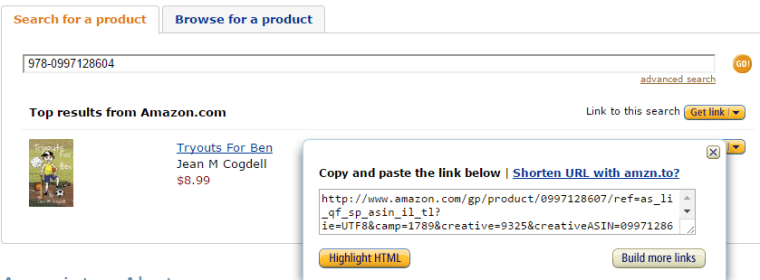
1- After you’ve found the product, click on “Shorten URL witamzn.to?” above the HTML code.

This gives you a short URL link that you can copy and link to any image.

screenshot_Wed_Jan_20_11.38.21

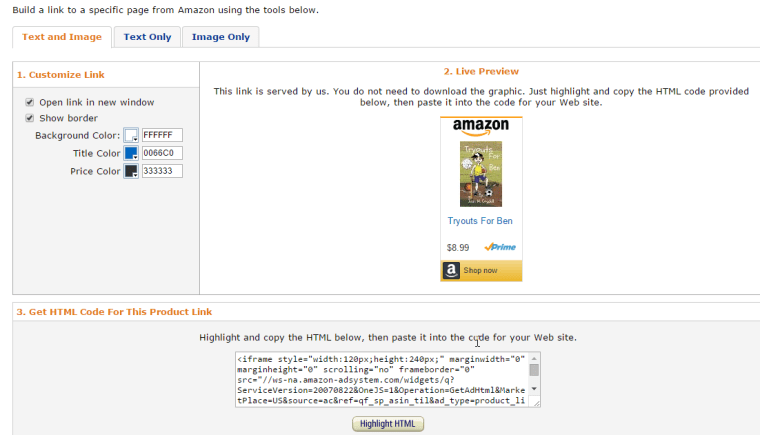
2- Click on the “Build more links” button on the right below the HTML code. 

This takes you to the screen below where you can select from 3 different customized links, Text only, Image with Text, or Image only.

screenshot_Wed_Jan_20_11.59.57

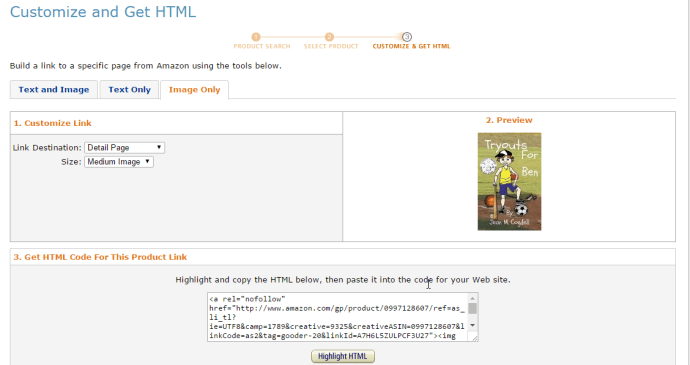
I like the image only, as it will give you a widget you can use on your website. That’s the one I have on the upper top left of this website. 

screenshot_Wed_Jan_20_11.45.50

3- Select one of the 3 and click Highlight HTML and copy.

4- Paste the HTML code in the widget you want to use on your website.

Now go sign up on Amazon Associates. 

Hope my tips were as helpful as Ana’s. If they were, or if you’ve had good success on Amazon Associates, let me know in the comments. I’d love to hear from you.

You can find me on Twitter @jeancogdell, Facebook at jean.cogdell and Amazon.com, stop by and say hey! Please remember to with a click and share this post with your Twitter peeps and Facebook fans.

Want to Simulcast between blogs?

Wow!

I’ve had a Blogger Website for years but maintaining two became too much so I let the Blogger go dormant.

Thanks to the latest post over at Blogging from A to Z I learned how to simulcast from my WordPress blog to my blogger blog.

Get the info on how you too can automate your info. Go to Blogging from A to Z and give IFTTT a try.

This is my first go but according to the IFTTT website you can simulcast between other applications such as Facebook and Twitter too.

I love, love, love finding new tech tips!

thankyou note card
Follow my blog with Bloglovin

One Lovely Award

I’ve been nominated by the sensual Elsa Holland for the One Lovely Blog Award. She has humbled me with the honor and her words of encouragement.

Thank you Elsa!

one_lovely_blog_award

This is my 4th Blog Award nominated by my peers. I’m overwhelmed with gratitude. No words can properly thank my readers. This award requires I tell you 7 things about myself, so here goes.

  • I’m an optimist, believing things will get better.
  • Living with chronic pain, I’ve learned to live.
  • I love Peanut M&M’s. (best with a glass of red wine)
  • Enjoy curling up by the fire with a good book. (can’t wait until it’s mine)
  • Love to travel, wish I could do more of it.
  • Love, love, love an afternoon nap.
  • As an introvert, I still find people fascinating. (must be the writer in me)

Now for the second requirement, link back to blogs I enjoy reading. You must check out, in addition to the amazing romance writer and blogger Elsa Holland, the following:

  1. If it’s not fun, why bother – Cassie Newell
  2. Sheila Good at Cow Pastures Chronicles
  3. The Bloggings of Jez Farmer – the lunatic, the lover and the poet.
  4. Ryan Lanz on A writers Path
  5. Lets Cut the Crap over at How the Cookie Crumbles
  6. David Allen over at Allen Fiction
  7. Practice your Flash Fiction with Jeremy Farmer

I could probably fill up this page with many more deserving blogs, but I’ll save some for later.

Take a moment and check what these great writers have to offer. I promise you won’t be disappointed.

Thank you again Elsa for thinking of me!