Do you know how to use Google forms?

You might be surprised how handy these forms will come in.

I haven’t built up an email list. I know, I just heard every successful author and blogger out there groan. Like you, I’ve read how important a list can be to stay in touch with readers.

However, I’m not ready to sign up with a service like MailChimp yet. And I’ve got enough on my plate what with the blog and my little sideline called writing.

This is where Google forms come in.

Need to send out a quick request for info, make a form and send it to friends, families, attach it to your blog, Facebook page or Tweet it out.

You can make all types of custom forms to meet whatever info you need.

Like this form, I made, asking for readers to review my little 32-page children’s picture book. She’s making her debut next week.

If you’d be willing to do a quick review for me click on the book cover below.
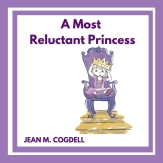
a 9 canva cover square front

Want to make your own form? To collect emails, send out announcements or whatever?

Just go to Google Forms and get started! It’s easy.

There are templates for party invites, registrations, sign-up sheets, evaluations and more!

Here is a tutorial to help you get started.

So tell me…

How do you gather information?

Do you use forms or a service like MailChimp?

Talk to me, the lights on and comments are now open.

You can find me on Twitter @jeancogdell, Facebook at jean.cogdelland Amazon.com, stop by and say hey! Please remember to click and share this post with your Twitter peeps and Facebook fans.

Do you know the definition of insanity?

Me!

Doing the same thing over and over and expecting a different result.

I’ve been working on learning how to use Kindle Kids Book Creator for my new picture book. This is to release it in e-version.

Well, the squirrels in my head have been spinning on their little wheels and getting nowhere, for the past week. Why?

Because, the Kindle Previewer only shows what the book will look like in Kindle products, not in Kindle apps on an Ipad or Iphone. This was driving me nuts.

I spent days pouring over the internet, sending out questions on Twitter and Facebook. I finally found the answer.

The reason why no one else reported this problem is… Drum roll, please! 

There is no problem! Duh!

You heard me.

Once published in .mobi format, Amazon converts book to the correct format for an Ipad. 

Click here and read a great article from EBook Architects  which explains everything you need to know about publishing ebooks. 

Now I can move on and get going with the rest of my stuff. After I take something for this massive headache a result of days head banging on desk.

Stay tuned, I’ll eventually get this Reluctant Princess to the end.

Any of y’all ever published a book with KKBC? 

What program did you use to publish your picture book?

Talk to me, the lights on and comments are now open.

You can find me on Twitter @jeancogdell, Facebook at jean.cogdelland Amazon.com, stop by and say hey! Please remember to click and share this post with your Twitter peeps and Facebook fans.

Here is the final cover…

a 9 canva cover square front


Do you know how to write a good book description?

You know the kind I mean.

It’s a small blurb that goes on the back of your book. 

Then another one a bit longer that will sell your book. At least we all hope so. 

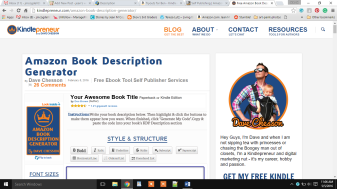
amazon book descrip gen

I only wrote about a dozen before I settled on one that I thought was pretty good. Then I had to write a short version and a long version. 

In all honesty, I may rewrite it again before I give the final okay to publish. It’s hard to know when something is good enough. You know what I mean?

I’ve read and read what makes good copy. Everyone has a different opinion, but most agree that the description needs to hook the reader.

Again with the hooks. Seems this term is one of the most important in writing. It pops up everywhere.

With all my reading and rereading books like mine in addition to successful writer tips, here is my takeaway on a decent book description. Fingers crossed mine is good enough to catch a reader.

  • There’s no magic formula. Too bad, I had high hopes.
  • First sentence – make sure people know what your book is about.
  • Don’t bore the reader to tears. If the description is boring, no one wants to read the whole book.
  • If possible end your description with a cliffhanger.
  • Think ad, not summary. Make it pop and sizzle.
  • Make it short and simple.

I hope these tips helped. Like I said, I keep tweaking mine.

Do you have any tips to add?

Please share!

Talk to me, the lights on and comments are now open.

Keep reading great links at the bottom of the page!

You can find me on Twitter @jeancogdell, Facebook at jean.cogdelland Amazon.com, stop by and say hey! Please remember to click and share this post with your Twitter peeps and Facebook fans.

THE 11 INGREDIENTS OF A SIZZLING BOOK DESCRIPTION by Mark Edwards
Creating Promotional Copy That Works: Book Descriptions by Marcy Kennedy


What are the steps to a successful new beginning?

Well, to tell the truth, I’m not sure myself.

But, each new book is a new beginning. A new story to launch. A new child to send into the cold cruel world. Buckle her seat belt and blast her off into the web outer space? 

blastoff

I know absolutely nothing about marketing. Nothing. But then, I knew nothing about writing a blog much less a book when I started this crazy idea.

The idea of writing and publishing a children’s book was the last thing on my list of things to do and now I’ve finished two. Even with good reviews, sales aren’t filling my bank account to overflowing. At least not yet. 

Yet the more I read about marketing and selling my books the less I understand. I’m on a mission to improve my knowledge about the flip side of being an author, selling what you write.

Now that the launch is almost here for “A Most Reluctant Princess,” I’ve made a list of what I need to do.

  • Update author bio

Check you bio, I was shocked to realize mine needed a lot of work. Maybe you’re like me and yours just doesn’t work for your current WIP. 

  • Set a launch date

Even if you are unsure of an exact day, as I am, set a general day. For me, I’m shooting for May, 21st. Fingers crossed. 

  • Develop a tagline

Done:  “Imagination is fun.” 

  • Develop a good book description for the back cover.

Done and off to the printer. 

  • Secure book reviews


  • Decide on a target audience


  • Link you book to trending topics – Google it


  • Update email signature to include new book release


  • Book trailer? 

I’m not sure about this one. 

Half way there and a bit nervous. I’m hoping that you’ll give me a hand and together maybe we can learn the tips and tricks of the trade. 

Help me, let’s figure out the next steps together!

Do you have another tip to add to my list?

What else do you think I need to do before launch?

Talk to me, the lights on and comments are now open.

Keep reading great links at the bottom of the page!

You can find me on Twitter @jeancogdell, Facebook at jean.cogdelland Amazon.com, stop by and say hey! Please remember to click and share this post with your Twitter peeps and Facebook fans.

How to Create a Rock-Solid Tagline That Truly Works by 
50 (AND MORE) WAYS TO PROMOTE YOUR BOOK
71 Ways to Promote and Market Your Book by