Do you know what makes great dialogue?

Turns out great dialogue contain beats. 

Sunday’s are when I catch up on my reading. Blog posts I’ve missed or tagged to read are saved for a slow Sunday afternoon. There are so many great bloggers/writers it’s hard to keep up, but I do try.

I’ve been working on dialogue in my WIP, so you can imagine my excitement when I came across not one but two posts by Dan Alatorre on how to make that dialogue great.

Like Dan, I like to bang out the dialogue fast and get the gist down before I lose the flow. Works more times than not.

What I learned from Dan today…

  • Write like people talk. In my family, the women drive the men crazy talking over each other, no such thing as one-at-a-time.
  • Don’t forget the beats. Yes, a dialogue needs beats.
  • A trick to adding those beats, jot down a list of actions to match conversation. Sort of like setting out all the ingredients before baking a delicious cake.

Click on the links below and read all of Dan’s tips and tricks to turn your good dialogue into great dialogue.

3 Steps To Brilliant Dialogues In Your Stories By

Dan Alatorre

How Your Dialogues Mess Up Your Story, Part 2 By Dan Alatorre


Now tell me, did you learn something new?

Do you have a dialogue tip to help me?

Do you find writing dialogue hard?

I HOPE YOU’LL TAKE A MINUTE TO FOLLOW ME ON SOCIAL MEDIA, JUST CLICK ON THE BUTTONS BELOW. I’LL LEAVE A LIGHT ON.


How to understand keyword and blog ranking

Well, it’s the end of another year.

And as your reading to ring in 2018 you may want to see how your blog did during 2017.

First, do what I did, Check those  WordPress Stats. 

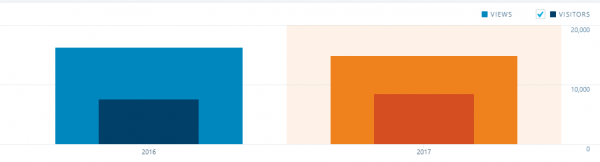
In 2016, I published 222 posts, with 16,046 views. In 2017, I published 172 posts with 14,636 views. Not too bad, considering, in 2017 I cut back my blogging to 3 times a week.

Understanding blog ranking, blog stats, and keywords can help improve your blog views.

There are lots of ways to check your blog stats and ranking. Websites that show which keywords work best for your posts.

Some of these tools I understand and some I are a bit over my head. But most of them are a big time suck. So bloggers, beware. Look, if your curious but don’t get mired in the muck. Or like me, you’ll end up with a big headache.

There are a few free services and free trials to help you figure out all this stuff. 

For instance…

GOOGLE TRENDS – Find out which keywords or subject are trending.

SERPSTATS – Website analysis and Domain ranking. Plus which top page/posts on your blog had the highest visibility.

KEYWORD RANK CHECKER on SERPS website- Discover the average monthly searches for a keyword and the cost-per-click (CPC).

KEYWORD RESEARCH – Helps discover which keywords are working on your blog.

WORD TRACKER – Find out which words are searched the most.

Read more to help you understand these websites —

Understanding Keyword Value

How to Improve Your Website’s Google Ranking

Best Keyword Research Tools For SEO: 2018 Edition

Bloggers, tell me…

Did you check your stats for 2017?

Did you fare better or worse?

Do you understand Keywords and Stats? (I’ll be honest, I don’t.)

I HOPE YOU’LL TAKE A MINUTE TO FOLLOW ME ON SOCIAL MEDIA, JUST CLICK ON THE BUTTONS BELOW. I’LL LEAVE A LIGHT ON.


Which social media sends you the most readers?

Is WordPress Reader, Google, Pinterest, Facebook, Instagram, Flipboard, or Twitter the best choice?

Or how about Reddit, StumbleUpon, Medium, or a market I’ve yet to discover? Seems a new one pops up every day. So how do we discover which is best for our blog?

Do you have a favorite you search engine? 

Okay, Bloggers hold on to your hat! Deep diving for answers today. 

All of these questions were rolling around in my head this past weekend and got me to thinking…

Am I wasting my time on the wrong platforms? Should I concentrate on just one or two and not spread myself like mayonnaise on bread.

Time for research. Which translates into dropping down the ole rabbit hole.

The first place I started, of course, was the Stats page in WordPress. But that was just a starting point. You can see from my image, according to WordPress, most of my referrers come from WordPress Readers.
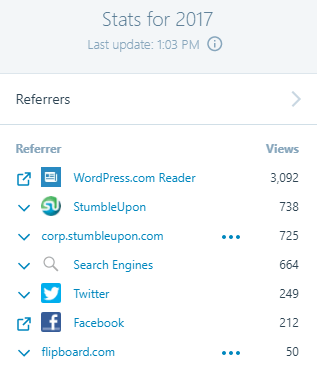
But, does that tell me how readers actually discovered Jean’s Writing? I’m not sure. The term “referrer” is referencing online sources – specifically sites or services that the referring page or link clicked on to get to my site. Clear as mud, right?

Look at this section on your STATS page to get a better idea of how many people are seeing your blog.  Below is how many views, visitors, likes and comments made to my blog.

However, that still doesn’t let me know which social media gets me the most bang for my time.

So, I did a little more digging.

Another great source is Google Analytics. Takes a little while to set it up but once you do you can see which social site is sending the most people to your website. I set up my account last year but hadn’t checked on it since. So, I headed over to see what was what.

Holy Cow! Google Analytics had zero stats for my website. Please don’t judge me too harshly. Because I’m embarrassed to tell you, I’d forgotten one very important step. The freaking Accept button. You know that button that says you agree to terms, yadda, yadda yadda…  

 

So y’all tell me…

How do you figure out all this stuff?

Or do you just go with the flow and not worry about who or how?

Do you concentrate on one social media outlet more than another?

Which social media do you think helps your blog the best?

Want to read more about which social media is sending visitors to your website? Click on the links below.

Who is Driving Visits to Your Site

What social media channels drive the most traffic to your website?

WordPress Stats

How to See Which Social Media Platforms Are Sending You the Most Traffic

I HOPE YOU’LL TAKE A MINUTE TO FOLLOW ME ON SOCIAL MEDIA, JUST CLICK ON THE BUTTONS BELOW. I’LL LEAVE A LIGHT ON.


Writers, look at the apps I found

Wow! I’ve found another list of apps to help us.

Last week I wrote a post with a lot of helpful apps for writers. Then today I read a terrific article with ten more. Of the ten, I’m familiar with just two!

That’s right eight new apps! 


I don’t know about you, but I get excited when I learn about new tools that make my life easier. Whether it’s a light-weight vacuum, a new grill, a beautiful pen, or a new app for writers. Anything that helps my writing, keeps me organized, and on track, is alright with me. 

The two I’ve used before…

The apps from this list I’ve added to my writing aides file are…

  • Piktochart. This looks terrific for PowerPoint presentations, newsletters and graphs.
  • BibMe. I don’t do a lot of bibliographies, but you never know when I might.

Click on the link below and read Derek’s complete list!

Now tell me, which ones are new to you?

Did any of his app list look interesting?

Leave me a comment and share your picks. 

Ten Must-Have Online Writing Tools For Writers By Derek Haines 

I hope you’ll take a minute to follow me on social media, just click on the buttons below. I’ll leave a light on.