How to speed up your word count

Are you participating in  NaNoWriMo this month?

Well, congrats! You’re a week in now. 

Not doing NaNoWriMo but still, need to write a lot more words every day?

Although I’m not participating this year, I’m here to cheer you on! And to help you up that word count, check out this post by Louise Foerster.

Ways to Thrive During NaNoWriMo: Bolstering Word Count 

When the clock is ticking, and your muse isn’t talking, this article may help move your story along.

What I gleaned from this article?

  1. All you need is words, so type some.
  2. Remember a good editor can fix a lot of mistakes.
  3. Use techniques and tools other writers have provided.
    • What tools or techniques?
    • Quotes from other publications. Prose, comments, verses or documents.
    • Send your characters into the world and show what they see and hear. Don’t forget to add their reactions.
    • Let your characters talk. You never know what they might say or where it will lead.
    • Use cringeworthy tricks.
      • You have to read her article for these.

And keep typing!

Like I said, I’m not doing NaNoWriMo but, I plan on using some of her ideas for my writing.

What do you think? Are these tips helpful?

Do you need to write faster?

I really want to know so leave me a comment.

Also, if you can please stop by my other locations and say “hey!” I’ll leave a light on. 

facebook jeans page   twitter-jeans page icon  pinterest-jeans page  stumble-upon-jeans page   amazon jeans page

 OR CLICK THE “WRITE ME” TAB AND SEND ME AN EMAIL.


Get the dash right when you write

Not talking Morse Code.

Does the Hyphen, EN Dash, and EM Dash ever confuse you?

They have me. Thank goodness for editors who know the difference.

I wonder if I’ll ever remember everything I need to know about punctuation. Seems the more I read the more I need to read. Something like that. Joel Friedlander posted a great article about using dashes instead of commas and how we can get the placement mixed up.

What I learned about the right way to use these punctuations…

  1. That the dash is not based on the font size.
  2. The difference between a Hyphen, EN, and EM.
    • Hyphen is shortest
    • EN is shorter than EM
    • EM is the longest
  3. The three are not interchangeable.
  4. An editors shorthand for where to put them.
  5. And the short-cut keystrokes to insert them.
  6. Short-cut keystrokes are a quick way to insert special characters. Of course, you can always click on the Special Characters menu but I’m a big lover of shortcut keys when writing in Scrivener or MSWord.
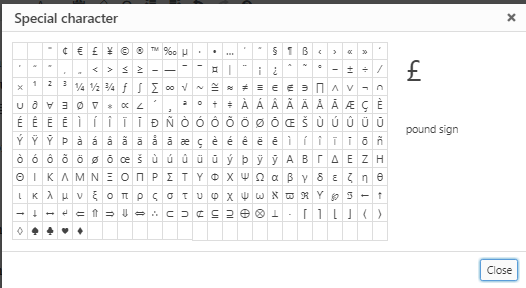
  7. For blogs click on the Special Character in the WordPress Visual Editor.

  • This screen pops up and you can select whichever character you need.

  • The Hyphen key is easy. It’s on our keyboard.
  • The EN Dash shortcut for Scrivener or MSWord is Ctrl+Minus.  Looks a bit like a hyphen and is used to connect a range, for dates or pages. Often found in indexes.
  • The EM Dash shortcut for Scrivener or MSWord is Ctrl+Alt+Minus. The EM dash is for a pause or parenthesis with somewhat more emphasis than a comma and somewhat less than what parentheses imply.
    •  The Punctuation Guide states, “Most newspapers — and all that follow AP style — insert a space before and after the em dash.”
    • However, this may not be practical for fiction as it may result in a formatting nightmare—resulting in a line break where you may not want one.

To learn more, click and read Joel’s entire post.

Hyphens, Em Dashes, En Dashes—Everything You Need to Know BY 

Keep reading more info here.

How to insert special characters in WordPress.

Did any of this help clear up things for you?

Do you use EN or EM dash in your writing?

What do you think?

I really want to know so leave me a comment and talk dashes.

Also, if you can please stop by my other locations and say “hey!” I’ll leave a light on. 

facebook jeans page   twitter-jeans page icon  pinterest-jeans page  stumble-upon-jeans page   amazon jeans page

 OR CLICK THE “WRITE ME” TAB AND SEND ME AN EMAIL.

What to do with old obsolete grammar rules?

Do we throw them out?

Or do we realize some rules are made to be broken?

 Hooray! At last, a common sense post about what to do about hard and fast rules that make no sense in this day and time.

6 Old Grammar Rules That Are Finally Going Out of Style by 

Here is my take on her 6 rules:
  1. Ending sentences with a preposition.
    • Guilty, but I didn’t know this rule was attributed to Winston Churchill
  2. Starting sentences with a conjunction.
    • Oh yes, guilty. This gem was apparently courtesy of teachers in the 19th century.
  3. Sentence fragments.
    • Now honestly, I write like I talk. And well…
  4. Split infinities.
    • This one drives me nuts. But what a relief, Kelly gives us permission to use as needed and explains why.
  5. Who vs Whom
    • I love her suggestions. Just avoid if unsure. But realize the word “whom” is for formal writing.
  6. Pronouns.
    • What about “they?” Turns out it’s not one but what else is a writer to use?

Click the link above to read more about Kelly’s thoughts on these obsolete grammar rules.

Questions:

Do you agree, some rules are made to be broken?

Is there another grammar rule that drives you nuts?

Are you guilty of breaking these six?

Do you have any tips to help writers with grammar rules?

Please share, let’s become better writers together. 

Also, if you can please stop by my other locations and say “hey!” I’ll leave a light on. 

facebook jeans page   twitter-jeans page icon  pinterest-jeans page  stumble-upon-jeans page   amazon jeans page

 OR CLICK THE “WRITE ME” TAB AND SEND ME AN EMAIL.

Do you know how to spot Scam Websites?

Spooky time of year, Halloween.

So watch out for goblins. Don’t let them latch on to your computer.

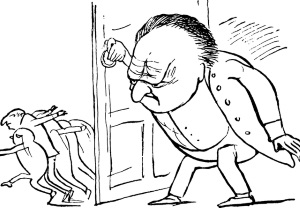
That’s right, Scammers want to trick you into opening the door. Don’t! Be careful and be aware. Keep those buggers out.

If you are unsure what to look for click and read this post by Daniel Nations.

How to Recognize Scam Websites Learn how to protect your identity anywhere online by Daniel Nations

Here is what I learned about how to avoid a Scammers trick. 

  1. Google is my friend…
    • Google an email link before clicking.
    • Google and research any link from Facebook, Twitter, Instagram or other social media.
  2. Even if the website seems legit…
    • check for spelling errors.
    • look for contact information
    • Find a privacy statement?
  3. As seen on…
    • Anyone can make this claim
  4. Trust…
    • Again, anyone can copy a seal of approval or trust security seal.
  5. Fake website address...
    • Is there a weird spelling in the address?
    • Lots of dashes and dots?
    • No dot-org or dot-com? Probably not legit.
  6. Http:// vs Https://…
    • One is secure and encrypted and one is not.
  7. Payment process…
    • No wire transfers is a no-brainer.
    • Refunds, Customer service? A must have.
  8. Where to double-check…

What do you think?

Did this arm you with a little more information?

Did you learn anything new? What?

Have you any tips for avoiding scammers?

Share in the comments. And let’s get only treats this Halloween.

Also, if you can please stop by my other locations and say “hey!” I’ll leave a light on. 

facebook jeans page   twitter-jeans page icon  pinterest-jeans page  stumble-upon-jeans page   amazon jeans page

 OR CLICK THE “WRITE ME” TAB AND SEND ME AN EMAIL.