Posts

How to select the best ebook conversion tool

Too many choices!

But fortunately, there is one that will work for you.

And thanks to 

So if you’re ready to convert and upload that best-selling book, keep reading.

Amazon KDP

KDP accepts ePub, Word doc/docx, HTML, mobi formats. Output mobi, and HTML.  In my book Tryouts for Ben, I uploaded a Word docx and had little trouble. I agree with David; it’s easy and almost fool-proof.  Don’t waste your time using fancy fonts, or formatting, because KDP will not recognize most of them. However, if you are confident with HTML, and CSS format, you can edit the converted file in HTML.

Barnes and Noble Nookbook

I’ve not converted any of my books to Nookbook. But David assures us it’s fairly straightforward. But doesn’t allow for HTML editing.

KOBO

Again, I’ve not yet used KOBO. It appears to be less than user-friendly and not sure I’ll bother with it. David didn’t appear to be impressed.

DRAFT2DIGITAL (D2D)

D2D accepts ePub, Word doc/docx, RTF files, and the output is ePub, mobi, or PDF. I did consider D2D but wasn’t happy with their conversion tool.

SMASHWORDS

Smashwords accepts files in ePub, Word doc (not docx.) Note: this means you must save your manuscript in the older version of Word.  Out put is impressive: ePub, mobi, PDF, PDB, lit, TXT, and many more. Again, this is one I considered but decided it wasn’t for me.

So which tool did I use?

computer-frogs 2

Check back tomorrow.

But in the meantime, head over and read David’s entire article.

The Convertible Cloud: Ebook Conversion Online

Click the “write me” tab or contact me onTwitter @jeancogdell, Facebook at jean.cogdell and Amazon.com, stop by and say hey! The lights are on and I’m waiting.

Please remember to share this post with your Twitter  peeps andFacebook fans.

How to make your pictures clickable

Everyone loves pictures.

Make your pictures more interesting by making them clickable.

Tricia Pimental, Author, blogger and reader sent me a request. She wanted me to explain a little about linking information and documents to a blog post or page.

I promised to try my best and hope this information is what she needs. Maybe one or two of y’all will benefit from the tips as well.

Why would you want to add a link?

  • Definitions
  • Purchases
  • Sharing other blogs

I hope this little video will help.

It’s easy as 1-2-3!

  1. Copy the web address that you want to point your readers to. It could be a 5 Star Review, your Amazon.com page or reference other websites.
  2. Then click on the picture or sentence you want to make clickable.
  3. Next, click on the insert/edit link and paste the web address there.

Your picture, book, icon, or sentence, should now be fully clickable, sending your reader to read more information.

Tricia Pimental, I do hope this is helpful and not too elementary.

Do you think making pictures clickable adds to a website?

Do you use click here links?

I’d love to hear from you! Click the “write me” tab or contact me onTwitter @jeancogdell, Facebook at jean.cogdell and Amazon.com, stop by and say hey! The lights are on and I’m waiting.

Please remember to share this post with your Twitter  peeps andFacebook fans.

Do you know if you are suffering from brain-drain?

hello-summer 1281232_640

But Beware of Summer Brain-drain!braindrain

An affliction that slips up on you along with the rising temperatures, humidity,thermometer-153138_640

and buzzing mosquitoes.

mosquito blood-158837_640

You may not notice it at first. Your brain cells and ideas drain away slowly when you decide to take a few days to welcome the sun and blue skies.sun-151763_640

Next, you’ll decide to skip a day of writing or blogging. I mean one day won’t hurt, or even a couple. Right? But before long a week has passed, you’ve forgotten a much-needed password and discover your muse is missing. You’ve developed foggy brain and reached the summer danger zone.

How do you combat this affliction , and survive until fall?

The cure for brain-drain can be done as you enjoy the summer.

  • Read good books. Notice the plural. One won’t get the job done.
  • Write. Write every day, even if it’s just fifty words. The writing doesn’t have to be prize winning. Once you get started, a sentence or two will become a paragraph and stop the brain-drain.
  • Music. Listen to music. It feeds the soul.
  • Watch old movies. That’s right old movies. Because the writers didn’t rely on “special effects” as much as the newer ones.

beach books-918521_640

Do you suffer from brain-drain?

What do you do to keep the mind moving right along during hot summer days?

Let us know- leave a comment!

I’d love to hear from you! Click the “write me” tab or contact me on Twitter @jeancogdell, Facebook at jean.cogdell and Amazon.com, stop by and say hey! The lights are on and I’m waiting.

Please remember to share this post with your Twitter  peeps andFacebook fans.

How to avoid the dreaded over 140 warnings

Yes, we all get the red warning from time to time. 

screenshot_Fri_Jul_08_10.11.00

Within Tweetdeck or Twitter, I use bitly  to automatically shorten my links. But, there are several to choose from such as Ow.ly, or TinyURL.com, all you need to do is to search for one that will work for you.

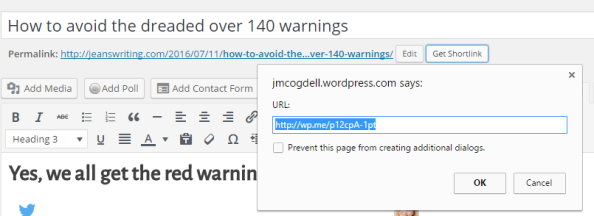
Everyone knows how to shorten your own post within WordPress. Use the Get Shortlink button!

screenshot_Fri_Jul_08_10.49.44

But how do you shorten a link that is not yours?

What do you do when you want to share a link plus add comments?

I use goo.gl URL Shortener which is an add-on to my toolbar. Here is a few of features for the Google shortener add-on.

► Features
  • Official goo.gl API support
  • Official goo.gl history/dashboard support with OAuth
  • Auto copy to clipboard
  • Keyboard shortcut
  • Context menu
  • QR Code
  • Highly customizable
  • Incognito mode
  • Share with your default mail client
  • Share with many different services 100zakladok, AOL Mail, Baidu, Bebo, Blip, Blogger, Bobrdobr, Delicious, Diaspora*, Digg, Diigo, Evernote, Facebook, Formspring, FriendFeed, Friendster, Gmail, Google Bookmarks, Google+, Hatena, Hyves, Hotmail, Identi.ca, Instapaper, iWiW, Lifestream, LinkedIn, LiveJournal, Mail, Mail.ru, meinVZ, Menéame, Mister Wong, Multiply, MySpace, Netlog, NUjij, OKNOtizie, Orkut, Oyyla, Ping.fm, Plaxo, Plurk, Pocket, Reddit, Segnalo, Sina Weibo, Sonico, Springpad, studiVZ, StumbleUpon, Technorati, Tuenti, Tumblr, Twitter, TwitThat, TwitThis, Viadeo, VKontakte, Wykop, XING, Yahoo! Bookmarks, Mail, Yammer

(Hate to admit this but I’ve never heard of some of these.)frog-sad

Don’t want an add-on? 

Well, Google may still be the site for you.

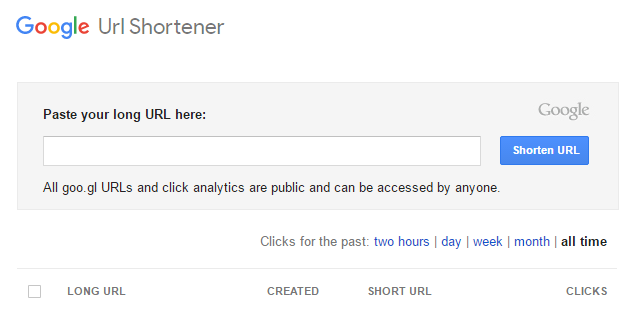
Just head over to the Google URL Shortener web page. Bookmark this page and use it to shorten the links. Super simple.

screenshot_google

Have you ever failed to share because the link is too big?

Do you think using one of these will make it easier to share?

Do you already use a link shortener? Which one do you like best?

Talk to me in the comments section, I’d love to hear from you! You can also click the “write me” tab or contact me onTwitter @jeancogdell, Facebook at jean.cogdell and Amazon.com, stop by and say hey! The lights are on and I’m waiting.

Please remember to share this post with your Twitter  peeps andFacebook fans.