How to tips for designing your book cover

Every day I learn more and more about what it takes to launch a book. 

Writing the story is just the beginning.

Even if you can afford a cover designer, the decision regarding the final visual product is yours. That’s a heavy responsibility.

That first impression can get a reader to stop, click and buy. First impressions are very important.

Should you design your book to blend with what you see on the bookshelf at Barnes & Noble? Or do you want your book to stand out from the crowd?

tulips-15155_640

We all want our book to be eye-catching. To make the shopper, whether on Amazon or in a brick and mortar bookstore stop and look. And of course, hopefully, buy.

But there is a fine line I think in between something unique or something bizarre. The same with copying the latest trends in book covers. We run the risk of coming off too trendy if we mimic other authors.

So, with or without a designer, where do you start? As with any story, research.

  • Check out other books in your genre, on the Best Seller Lists (all of them).
  • Look at books by your favorite readers. What do you like, or dislike about those covers?
  • Consider the books that are in ebook and print form.

I fall in the DIY camp. It takes a lot more time and effort but can be done.

Like a cook, making a recipe handed down from her grandmother, I add a pinch of or dash of the following to bake up a beautiful (hopefully) cover:

  • An Illustrator located through a referral from a local writers group.
  • Free image editor (similar to Adobe) Sumo Paint
  • Adjust image size as needed (ie 300 dpi) with Paint.net  by Windows 
  • Use ebook template to size and adjust book template with Canva.com
  • For additional images free of copyrights I like Pixabay.com and Openclipart.org 

Trendy or Unique?

I don’t think there is a right or wrong answer. Just like each book and each story, it’s yours. Do the research and it your way! 

Check out Jo Robinson’s post on book covers.

IT’S ALRIGHT TO HAVE A TRENDY BOOK COVER

What do you think? Trendy or Unique? Have you designed your own book cover? Are you in the midst of designing a cover? What programs or websites do you prefer to use to get the job done?

Tell me your thoughts in the comments section.

You can find me on Twitter @jeancogdell, Facebook at jean.cogdell and Amazon.com, stop by and say hey! Please remember to with a click and share this post with your Twitter peeps and Facebook fans.

Do you think free & unlimited books are better?

Well, let’s admit it. Everyone loves to get a good free book. 

But how about the writer?

Does giving away a freebie help or hurt?

Are we becoming the McDonalds of writing?

mcdonald-998495_640

God! I love their fries!

I’m a member of Kindle Unlimited and I love downloading and reading books for FREE through that service. When I first became a member there were a lot of good books to choose from, however, now it seems there are less and less. Not everyone seems to want to get into the program. I’m not sure why. Maybe it has to do with the pages read payment system. 

You’re eligible for royalty payment from Kindle Unlimited (KU, or Abonnement Kindle in France) and the Kindle Owners’ Lending Library (KOLL) for pages an individual customer reads in your book for the first time. A customer can read your book as many times as they like, but we will only pay you for the number of pages read the first time the customer reads them.

This is not necessarily a bad thing. At $.57 cents a page, when a book is read cover to cover that can add up to serious money. 

But, and this is a big but, the serious money only comes when enough people read your book cover to cover. However, I guess that could be said about the number of people who buy a book too.

I’ve read a lot of wonderful books for Free, and I’ve started and not finished a lot of mediocre books for Free. At first I felt guilty about not finishing a book, but then I remembered my time is valuable too. 

On the whole I think it’s a good system if you’re going to make your book available for FREE. 

Will publishing ebooks lead to longer books in general?

What If Authors Were Paid Every Time Someone Turned a Page? by  PETER WAYNER

Kindle Unlimited Paid Authors $0.0058 Per Page Read by Nate Hoffelder

Into Kindle Publishing? Under New Payment Rules, You Should Write Longer Books By

Writers what do you think?

You can find me on Twitter @jeancogdell, Facebook at jean.cogdell and Amazon.com, stop by and say hey! Please remember to with a click and share this post with your Twitter peeps and Facebook fans.


Here are the Free, Info Templates I promised

Not one, but two!

Two templates for you to use.

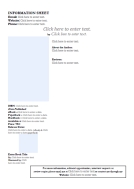
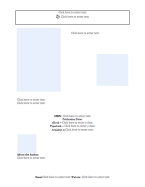
Just fill in the blanks of the Author Information Sheets located at the bottom.

But first I wanted to share with you the ones I’ve been working on for my book.

A local Author Con is coming up in May and I’ve been busy working on some AI Sheets for my book. I like the Sheet 2 best, although the Sheet 1 contains more information. I’m not sure more is always better.

What do you guys think?

AI Sheet
Sheet 1
Ben sheet 2
Sheet 2

With these templates you can make your very own customized AI Sheet. For the basics, I’ve made it a simple click and fill in the form type of templates. But you should be able to adjust these templates by adding or deleting information to make them more personal for your book.

Now go forth and have some creative fun. And do let me see some beautiful flyers!

Just click on the thumbnails and download. (Fingers crossed this works!)

AI 1          AI 2

You can find me on Twitter @jeancogdell, Facebook at jean.cogdell and Amazon.com, stop by and say hey! Please remember to with a click and share this post with your Twitter peeps and Facebook fans.

Do you need to make a flyer to promote your book?

Yes, you do.

Not like those littering your car windshield at Target or dropped on your front porch every weekend.

No, this is something called an Author Information Sheet, AI for short.

And not only is it important, but apparently it’s kinda expected when you go to a book fair, expo or present your book to a library or bookstore. 

Who knew?

Don’t tell me? You did! Guess as usual, I‘m the last to figure out these things. Sigh… Well, better late than never.

So what exactly is an Author Information Sheet?

It’s a pitch sheet for you and your book.

An AI sheet is a single sheet that introduces your book to the library, book fair, bookstore, or well, you get the picture. 

On this one sheet of paper, the reader knows who you are, what you look like, where and how to contact you, the name of your book, when it was released, what the cover looks like, the genre, a brief description, the cost, where to order or buy it, and some glowing reviews. 

The job of an AI is to get the attention of readers, hook them and then reel them in for the sale. 

Cool, right?

information-1015297_640

Sounds like a handy, hardworking little devil to have around. I might just print off a few and keep them in the car. Never know when an opportunity might come knocking.

Just because I’m a self-published author doesn’t mean I don’t want to look and act any less professional than an author published by one of the big houses. No laughing out there. I’m doing my best. And printing out a few AI sheets is a good step.

It’s a simple thing and it can speak volumes to someone who wants to know about your book. This sheet can tell them about the book, you, your website and where to find all three. Pretty cool and worth a little bit of time.

Click on the following link, to find download templates you can customize for your book. Like the scouts, always be prepared. 

How to Create an Advance Information (AI) Sheet for a Self-published Book by

Okay, does anyone out there use an AI sheet? If so, do you have a better template?

Is this something you think would be useful?

Talk to me people.

Leave me a comment or you can find me on Twitter @jeancogdell, Facebook at jean.cogdell and Amazon.com, stop by and say hey! Please remember to with a click and share this post with your Twitter peeps and Facebook fans.