Unique, beautiful or strange; how do you select the best name?

Naming characters can be hard. Is for me. I worry over them like newborn babes.

So…

Just how important is choosing the right name?

Turns out very! That is if you want to write memorable characters. No writer wants their readers to go whats-his-name killed whois.No, we want our characters to come alive on paper. Well, how do we select really good names? I don’t know all the answers but Anne R. Allen wrote a post…

10 Tips for Finding Memorable Character Names for your Fiction

In her post, she gives us ten things to consider when selecting names.

  1. Name only star players.
    • I love this tip. A delivery guy is just a delivery guy.
  2. Don’t confuse readers with same sounding names.
  3. Don’t change names in the middle of the story.
    • Nickname? State it up front and go with it. I need to give this some thought.
  4. Make sure the name fits the century.
  5. Check the spelling and name is familiar in the country, state you’re writing about.
  6. Don’t make up fake names unless writing fantasy.
    • Only works for fake worlds.
  7. Run your chosen names through Google.
    • Good advice. Don’t want the name to be a real person living around the corner.
  8. Avoid overused names.
    • Hmm, may have a problem here. Got work to do.
  9. Try name generators.
    • I like Scrivener generator but there are several on the web.
    • Check the obituaries for a cool name.
  10. If you decide to change a name mid-stride of your WIP, do a search and replace to catch each one.

I believer her tips could also apply to places.

Click on Anne’s link above and read her entire post, she gives a lot more information and a few great resource links.

Well? What did you think?

Do you need to change a characters name?

Think you are better prepared to select a name?

Do you have any good tips to share for picking the perfect name?

PLEASE FOLLOW ME ON SOCIAL MEDIA BY CLICKING ON THE LINKS BELOW. STOP BY ANYTIME, I’LL LEAVE A LIGHT ON. 

FacebookTwitterAmazonPinterestStumbleupon

You need to double your Amazon security

You heard right.

Time to double security and protect your books on Amazon. 

Now, not only do I need to work on this year’s taxes, but looks as if I may need to work on my Amazon account.

What the hell? Hackers are now invading Amazon? You’ve got to be kidding me.

I feel as if I’m playing Wack-a-Mole trying to avoid hackers and stupid people. This is getting ridiculous. I change my passwords from time to time, but now I’ve got to do more to keep these crooked jerks out.


Thanks to Janice Hardy over at Fiction University for the warning.

Here’s what I learned today about Amazon Security…

  • Kindle Direct Publishing (KDP) accounts are linked to my regular Amazon account.
  • Hackers attempt to break into customer Amazon accounts every single day.
  • If a Hacker gains access to my Amazon account they have access to my KDP.
  • A Hacker will change my password, locking me out of all my accounts.
  • Two-step verification is the best way to protect both.
  • Set up two-step verification through my Amazon account.

Two-step verification is a pain in my butt. There I said what most of you are thinking. But getting back control of KDP and the books you’ve slaved over for months is more important.

Click on the link to read the entire article and get step-by-step instructions on how you can protect yourself and your Amazon accounts.

Is Your Amazon Account Secure? By Janice Hardy

Do you use two-step verification with accounts?

Did you realize if a hacker gets into your Amazon account that KDP is toast?

Do you have a security tip you can share?


I HOPE YOU TAKE A MINUTE AND FOLLOW ME ON SOCIAL MEDIA, JUST CLICK ON THE LINKS BELOW. I’LL LEAVE A LIGHT ON.

FacebookTwitterAmazonPinterestStumbleupon

Do you know how to help Google find you?

Want to rank higher in Google?

Then make sure your images are optimized for those all those pesky little search spiders and bots. Internet Bots


No, not gonna scare you with SEO talk. But, if you want to help Google and other search engines find your book or blog, add information to your images.

SEO

After reading how a post by Mae Clair over at Story Empire Blog, I realized image information is one more tool used by search engines. Laptop tools image


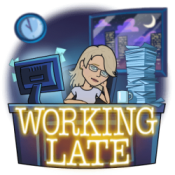
Bitmoji Jean Cogdell working late
Me burning the midnight oil.

Heading over to fix a lot of my images now. Sigh… may take me awhile.


Find out the importance of adding information to your images. Read…

 The Importance of Alt Text, Image Titles, and Image Descriptions  By MAE CLAIR

So, what do you think?

Bitmoji Jean Cogdell wants to know
Talk to me

Are all your images pointing to your book or blog?

Can Google, Yahoo or Bing find you easily?

Have you already added this information to your book cover and blog images?


NOW PLEASE TAKE A MINUTE TO FOLLOW ME ON SOCIAL MEDIA, JUST CLICK ON THE BUTTONS BELOW. I’LL LEAVE A LIGHT ON.


Which social media sends you the most readers?

Is WordPress Reader, Google, Pinterest, Facebook, Instagram, Flipboard, or Twitter the best choice?

Or how about Reddit, StumbleUpon, Medium, or a market I’ve yet to discover? Seems a new one pops up every day. So how do we discover which is best for our blog?

Do you have a favorite you search engine? 

Okay, Bloggers hold on to your hat! Deep diving for answers today. 

All of these questions were rolling around in my head this past weekend and got me to thinking…

Am I wasting my time on the wrong platforms? Should I concentrate on just one or two and not spread myself like mayonnaise on bread.

Time for research. Which translates into dropping down the ole rabbit hole.

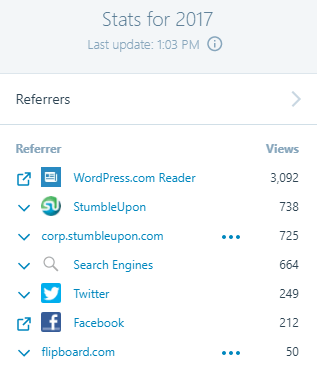
The first place I started, of course, was the Stats page in WordPress. But that was just a starting point. You can see from my image, according to WordPress, most of my referrers come from WordPress Readers.

But, does that tell me how readers actually discovered Jean’s Writing? I’m not sure. The term “referrer” is referencing online sources – specifically sites or services that the referring page or link clicked on to get to my site. Clear as mud, right?

Look at this section on your STATS page to get a better idea of how many people are seeing your blog.  Below is how many views, visitors, likes and comments made to my blog.

However, that still doesn’t let me know which social media gets me the most bang for my time.

So, I did a little more digging.

Another great source is Google Analytics. Takes a little while to set it up but once you do you can see which social site is sending the most people to your website. I set up my account last year but hadn’t checked on it since. So, I headed over to see what was what.

Holy Cow! Google Analytics had zero stats for my website. Please don’t judge me too harshly. Because I’m embarrassed to tell you, I’d forgotten one very important step. The freaking Accept button. You know that button that says you agree to terms, yadda, yadda yadda…  


So y’all tell me…

How do you figure out all this stuff?

Or do you just go with the flow and not worry about who or how?

Do you concentrate on one social media outlet more than another?

Which social media do you think helps your blog the best?

Want to read more about which social media is sending visitors to your website? Click on the links below.

Who is Driving Visits to Your Site

What social media channels drive the most traffic to your website?

WordPress Stats

How to See Which Social Media Platforms Are Sending You the Most Traffic

I HOPE YOU’LL TAKE A MINUTE TO FOLLOW ME ON SOCIAL MEDIA, JUST CLICK ON THE BUTTONS BELOW. I’LL LEAVE A LIGHT ON.