Did you know it only takes one?

One ISBN.

That’s right, one ISBN to print with IngramSpark and CreateSpace.

We all want our books available in as many places as possible but if the same paperback book has more than one ISBN, it can become confusing.

There is an order to this madness. And steps you can take to stay sane as you wade through the swamp of self-publishing.

  • First, purchase your ISBN number from Bowker.

Yes, it costs to buy your own ISBN but you retain more control. Consider buying in bulk rather than one at a time. I found it cheaper to go that route. The numbers never expire and they are yours to use for future books.

  • Second publish your book with IngramSpark (Lightening Source) first

This is very important. You must publish with them before CreateSpace.

  • Third, register log onto Bowker and register your book title which connects the ISBN to the publication.

Registering your book title is super important, don’t skip this step.

  • Last upload your book via Createspace. 

At the ISBN page, choose “provide own ISBN.”
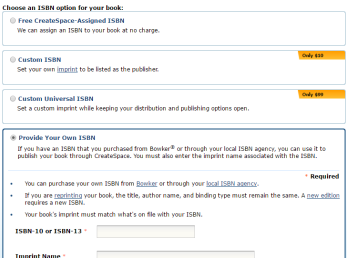
screenshot isbn

That’s it! Your book will now be available through both IngramSpark and Amazon.com (CreateSpace) but the book will have the same ISBN number.

Why is this important?

Whether your Aunt Tilly orders it from Amazon or your local library orders a copy through IngramSpark for their shelves, the ISBN is the same.

I’ve not decided it this is important for ebooks yet.

What do you think? Do you think it’s important to own the ISBN for ebooks as well as print books?

Talk to me, the lights on and comments are now open.

For more information about ISBNs click on the article at the bottom.

You can find me on Twitter @jeancogdell, Facebook at jean.cogdelland Amazon.com, stop by and say hey! Please remember to click and share this post with your Twitter peeps and Facebook fans.

And One ISBN Shall Bind Them…. by Amy Collins


How you can avoid my mistakes

And boy do I make a lot of them. Or so it seems.

I hope by sharing with you, these posts will stand as a reminder to myself, not to repeat the same mistakes over again.big mistakes

Why? Because mistakes are costly.

Mistakes cost when you have to do something over and over, not just in time but often in money too.

How you can avoid my mistakes…

  • Use the right software for the right job.

I tried to use “workaround” software but that only make the job harder and take longer. You know what I mean like using a shoe to hang a picture instead of hunting down that long-lost hammer in the garage.

  • A little investment is worth your time and sanity.

No one software does everything. Pick the one that works best for each task.

Listed at the bottom are some of the ones I discovered and love.

  • Don’t go with the hype.

Adobe Acrobat has been the go to forever. Gag. I bought Adobe Acrobat and went almost batshit crazy trying to get it to work like I wanted. Canceled my purchase, did more research, and bought Nitro10. Happy days!

  • Some free things are good.

Again with Adobe, people have sworn by Adobe Photoshop for years, forget about it. I have discovered a program that is cheaper and easier, in my opinion, to use called Sumo Paint.

Paint Net is a great program for sizing the DPI of your pictures and drawings. It’s free and super easy to use.

Canva.com is great for making a book cover. Although you may still have to change the DPI after it’s finished.

Do you have a software that has made publishing easier?

A favorite software you can’t live without?

Do tell…

Talk to me, the lights on and comments are now open.

Keep reading I’ve listed links to my favorite software must haves at the bottom of the page!

You can find me on Twitter @jeancogdell, Facebook at jean.cogdelland Amazon.com, stop by and say hey! Please remember to click and share this post with your Twitter peeps and Facebook fans.

Nitro Pro PDF Software for You

Nitro Pro has a monthly plan or yearly for $159. Worth every penny. Very user-friendly. And it offers a free trial periodInterfaces well with Word documents so if you can use Word you can use Nitro. 

Serif PagePlus X8 desktop publisher

I love this for formatting a picture book. My editor suggested I give the program a look and I’m so glad I did. Inserting and moving pictures around is so easy even I can do it. After done just publish to PDF and voila! Ready to submit to IngramSpark. There are later versions X9 and X10, but I bought X8 on sale for $39.99. I love a sale. Reg price is $119.

Sumo Paint Photoshopping in your browser

You can use this program online for FREE or upgrade to Sumo Paint Pro for $4.00 a month. This is an amazing photoshop program for almost nothing.  It’s easy to learn and there are several videos on YouTube to help.

Paint.NET a free image and photo editing software

Do you have a sweet tooth?

You may say no, but I bet you do.

Everyone has a sweet tooth, even if it’s a tiny one.

Me, I love sweets! And I love learning something new about writing.

Imagine my excitement when I opened a blog and read all about writing with Twinkies. You read that right.

I mean, who doesn’t love those sweet, make your teeth hurt cream filled cakes? But what did those lovely little darlings have to do with writing? I had to know.

Thanks to Robin Rivera over at Write On Sisters for explaining that every writer needs to give their readers a little tasty cake throughout the story.

Are you as intrigued as I was? Then click read —

Story Twinkies: Do You Need One?

Do you know the definition of insanity?

Me!

Doing the same thing over and over and expecting a different result.

I’ve been working on learning how to use Kindle Kids Book Creator for my new picture book. This is to release it in e-version.

Well, the squirrels in my head have been spinning on their little wheels and getting nowhere, for the past week. Why?

Because, the Kindle Previewer only shows what the book will look like in Kindle products, not in Kindle apps on an Ipad or Iphone. This was driving me nuts.

I spent days pouring over the internet, sending out questions on Twitter and Facebook. I finally found the answer.

The reason why no one else reported this problem is… Drum roll, please! 

There is no problem! Duh!

You heard me.

Once published in .mobi format, Amazon converts book to the correct format for an Ipad. 

Click here and read a great article from EBook Architects  which explains everything you need to know about publishing ebooks. 

Now I can move on and get going with the rest of my stuff. After I take something for this massive headache a result of days head banging on desk.

Stay tuned, I’ll eventually get this Reluctant Princess to the end.

Any of y’all ever published a book with KKBC? 

What program did you use to publish your picture book?

Talk to me, the lights on and comments are now open.

You can find me on Twitter @jeancogdell, Facebook at jean.cogdelland Amazon.com, stop by and say hey! Please remember to click and share this post with your Twitter peeps and Facebook fans.

Here is the final cover…

a 9 canva cover square front