Do you want to know a secret?

I blog about things I want to remember.

elephant-1090834_640

Yep! Sharing with you is the best way I know to squirrel away nuggets of wisdom so that I won’t forget them.

squirrel-453722_640

If I didn’t talk or write about stuff, I’d forget and forget quickly. So y’all are the lucky ones, or unlucky, that get to hear all about my aha moments. Even if I’m a day late to the party. Which today may be the case. LOL

But, still, I’m excited about the information I discovered in Kristina Stanley‘s latest blog post!

Instant Book Previews Via Amazon. Very Cool!

Here is how it works

Kindle instant previews can be embedded on the web or shared as a link via email, text and other favorite apps. Anyone can start reading the preview for free by clicking on the link, just like this example. The Kindle instant preview provides:

  • Free content to keep traffic on your site
  • Free access to a sample of the book
  • Adjustable font sizes for the readers’ comfort
  • Direct link to book purchase from Amazon
  • Download link to get the free Kindle app

Until now, I had no idea how to set up the instant previews for an ebook.

It as easy as 1 – 2 – 3. No download or app to install! Took me about 5 seconds! Wow!!!

And guess what?

You can even use the link on Twitter! 

Thank you Kristina!

If you’d like to add a free preview for your ebook to your website or twitter go to one of the links below.

For  (U.S.)
For (U.K.)
For (Australia)
For (Canada)
For (India)

Are you already using the FREE Preview for your ebooks?

Is this new to you too?

What do you think about it?

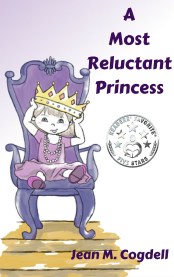
Click on my book image below and see how it works!

I’d love to hear from you! Click to write me or contact me on Twitter @jeancogdell, Facebook at  jean.cogdell and Amazon.com, stop by and say hey! The lights are on and I’m waiting.

Please remember share this post with your Twitter peeps and Facebook fans.
Twitter ad 01


Do you need inspiration for your story?

To keep your writing fresh?

Don’t know about you, but I’m always searching for ways to get inspired. Because if I’m inspired, that inspiration will be reflected in my writing.

A few days ago I wrote a post, How to make progress on your novel without writing, about breaking through sluggish points in writing when you’re not sure what comes next.

Ways to step away from writing without leaving the manuscript behind. I loved y’all for leaving so many wonderful comments and suggestions.great-idea-1426607_640

One reader, Phillip T Stephens suggested– 

Read novels similar to your own and see what other novelists did. Joyce said all artists steal. The key is how well we do it. Did another author solve your problem? Great. How can you adapt that to your novel in a new and interesting way? Did another author come up with a really crappy solution? Even better. How can you spin that terrible solution into the perfect solution for your novel?cactus-1063094_640

Binge-watch movies and series to prime your creative pump or recharge your batteries.”popcorn-1433326_640

I took Phillip’s suggestions to heart and started reading other murder mysteries to find where the author placed their “inciting incidents,” where the story speeds up and then slows down to give the reader a second to catch their breath. Phillip’s idea is a great way to understand the pros use movement and pace in a story like yours.

What do you think?

Have you ever binge-watched a series or movies? 

What about spending a day just reading or even a week? (I love taking a few days to binge read.)

Here are a few more ways to study a favorite novel or movie.

A favorite movie? Try SlideShare. or IMDb.

A favorite book? One similar to your WIP? Try SparkNotes or Pink Monkey.

Need more? See if one of these meets your need:

ShmoopJiffyNotesBookRagsBookwolfGradeSaverWikiSummaries.

Okay, here are my questions of the day–

Do you use Cliffnotes for your research?

Can you share other websites or sources for research?

How do you research a new project? Or a WIP that’s ground to a halt?

I’d love to hear from you! Click to write me or contact me on Twitter @jeancogdell, Facebook at  jean.cogdell and Amazon.com, stop by and say hey! The lights are on and I’m waiting.

Please remember share this post with your Twitter peeps and Facebook fans.

How to keep things moving at breakneck speed

With “inciting incidents.”

As writers, we’ve all heard of the “inciting incident.” And that we need them to keep the story moving and the reader turning the pages. But, how many, where do you place them in a novel?

research 2

I’m in the beginning stage of fleshing out my patchwork outline for a new WIP, you know all that boring stuff. Like research.

In the midst of all this research, a really good post caught my eye. “Get Your Story off to the Right Start: The Inciting Incident,” by Bryan over at Become a Writer Today.

  • You need an Inciting Incident in the First Quarter of Your Story to avoid boring the reader. And we know what a boring reader does… stops reading.
  • Change Your character’s life. Better or Worse change the character is changed. They can never go back to the way things were because of this inciting incident.
  • Awaken a Hidden Desire in Your character. When writing the inciting incident of your story, find out what your character wants (or sub-consciously) and then use the incident to awaken a desire in them.
  • Work Backward from your climax, from your ending. From the moment of the inciting incident, everything should build towards the climax.

Click on the link above to read Bryan’s complete article.

My questions of the day!

Do you use more than one inciting incident?

Or is one big inciting incident enough?

Do share I’d love to hear from you!

Click to write me or contact me on Twitter @jeancogdell, Facebook at  jean.cogdell and Amazon.com, stop by and say hey! The lights are on and I’m waiting.

Please remember share this post with your Twitter peeps and Facebook fans.

Do you know how to compile a mobi document without a TOC?

First, let me say if you have a better way – PLEASE – let me know.

A few posts back, I talked about my disappointment with KKBC (Kindle Kids Book Creator.)

The end results were lovely but limited. Very limited.

For instance, once a book is up on KDP (Kindle Direct Publishing) you can click on the book and download a .mobi file to use.

But for a book made with KKBC, this doesn’t work. Yes, the file downloads but not everyone can open it on their devices.

That means sending this mobi file, from KDP, to reviewers may leave you embarrassed. Why? Because the reviewer may not be able to open it. Now, I confess I have no idea how to predict who can open it and who can.

So what to do?

While not perfect for picture books, Scrivener provided a mobi file I could live with.

I’m sure most of you know that Scrivener will compile your document into an ebook file. So I won’t bore you with how to compile an ebook. But if you want to compile a picture book or a short manuscript “without” a table of contents these tips might help.

Most children picture books don’t need a TOC.

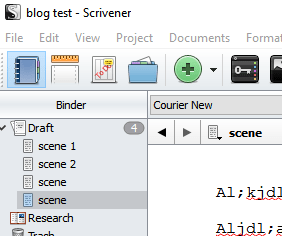
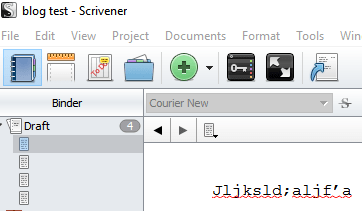
I spent hours listening to videos and reading blogs before I finally figured out how to avoid the automatic contents page in Scrivener.

The only way, I found, to avoid having a TOC show up in the compiled mobi file was to delete the names listed on the scenes or chapters leaving that space blank.

toc 3           TOC 2

So there you have it. I used this process for making and downloading a mobi version of my picture book that I can send to reviewers.

Is it as nice or pretty as the KKBC book? No, but it does give me a file I can email out for review.

I hope some of you amazing computer gurus and Scrivener pros step up and give us your expertise.

What do you think?

Any other suggestions?

Was this post clear as mud? 

Keep reading for great reading on Scrivener TOC!

I’d love to hear from you! Click to write me or contact me on Twitter @jeancogdell, Facebook at  jean.cogdell and Amazon.com, stop by and say hey! The lights are on and I’m waiting.

Please remember share this post with your Twitter peeps and Facebook fans.

Scrivener – How To Compile With Style

Scrivener for Mac Tutorial: How to turn a list of topics into a table of …

Scrivener Quick Tip: Building an eBook Part 1

5 star cover ebook