
How to make buying easy for your readers

All you need is a simple order and pay button.


click-ORDER 978044_1280


Click-pay


Do you have extra books left over from a book festival? Have some “how-to” worksheets, a writing workshop/seminar, or workbook? The ideas are endless.

The holidays will be here before we know it so put your thinking caps on. Is there something hidden on a long forgotten shelf or lurking in the shadows of your mind that would be perfect to sell on your website.

You can make a special button from a picture, book cover or use buttons like these. Feel free to right click and copy/save the red buttons above if you want.

You no longer have to be a self-hosted blogger to add this feature. Now WordPress dot com made one available for their bloggers.

Okay, okay, I can hear what some of Y’all thinking. Jean didn’t know about this? Well, as usual, I’m a little behind with some of my updates. But, better late than never. Am I right?

Now back to adding that purchase and pay button. As with all new things, there is a trick. You need to use the new Visual Editor, not the old one. Now I’ll admit, I prefer the old editor to write my blog posts. I find it easier to navigate and just plain like the look better. I love the SAVE AS DRAFT because it is large and easy to find. Using the new format, I’m always nervous if the draft is saved or not. Yes, I know there is a saved button. But, sigh, sometimes I have to move with the technology. And this is one of those times.

Here is the WordPress.com link that explains how to make and add a button to your website.

https://en.support.wordpress.com/simple-payments/

I can’t be the only friend you have who didn’t know about this feature. So be kind and share my post. You never know who might need it to sell their books or widgets.

Well, what do you think?

Is this something you can use?

Are you ready to open up shop?

Have something to sell? What?

Don’t forget, pass it on!

Leave me a comment and tell me what you think about this feature of WordPress.com.

Please stop by my other locations and say “hey!” I’ll leave a light on. 

Facebook           StumbleUpon              Twitter        Amazon.com

Or to connect with me, click the “write me” tab.

Want to know the truth about pop-ups?

Want to Increase Your Blog Readership? Kill that Popup! By Anne R. Allen

Shares with us the unvarnished truth about what readers think of all those pop-ups on your blog.

I agree with Anne.

Here is what I think of pop-ups!

Not gonna keep reading if I have to hunt for a tiny X to close a damn box. Or worse, fill out a form just for the privilege of reading your page. Note not gonna happen.

Ads are not so bad as long as they don’t pop up and obstruct the post. Although I have allowed WordPress to put them on my blog, I’m still on the fence about them.

So stop with the sign-up subscription or buy my book, pop-ups, please.

What do you think?

Agree with Anne? Or do you like them?

Can’t wait to hear your answers. Leave them in the comments.

Please stop by and say “hey!”  I’ll leave a light on. 

You can find me…

Facebook      StumbleUpon    Twitter    Amazon.com

Or to connect with me, click the “write me” tab.
Are you searching for that “right” word?

Is your writing bland or boring? 

When the thesaurus search doesn’t find what you want. Where can you look?

Time to spice things up, and no not talking about sex. But tossing out the ho-hum “go to” words we use over and over.

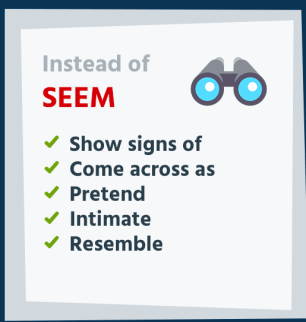
Click on the link below for some fun infographics that may help you get rid of a few overused words.

28 Boring Words Alternatives – Improve Your Writing by Jack Milgram

My favorite of the 28 is 

Instead of Seem, use words infographic
  Image courtesy of   Jack Milgram

Which one is your favorite?

Do you think infographics are helpful?

Can’t wait to hear your answers. Leave them in the comments.

Please head over and “like” my Facebook page at Facebook at jeanswriting . Or to connect with me, click the “write me” tab. Don’t forget you can follow me on StumbleUpon,  on Twitter @jeancogdell , and Amazon.com.

Please stop by and say “hey!”  I’ll leave a light on. 

Do blog makeovers need to be complicated?

No.

Something as simple as a new or different font can give your blog a fresh new look.

Typing on laptop

A few days ago I wrote a post about trending fonts. I know, the idea of fonts trending was a surprise to me too. However, some seemed a bit intimidated about changing or tweaking their theme.

In WordPress, you can customize your theme. Changing the font is one of the simplest ways to make your blog them unique.

Did I explain it okay? 

What do you think? Are you ready to try?

Did it work?

PS: Lately, I’ve had a bit of trouble with my audio. Please let me know if it sounds wonky. 🙂

I like to hear thoughts. Leave me a comment and let’s talk.

Please head over and “like” my Facebook page at Facebook at jeanswriting . Or to connect with me, click the “write me” tab. Don’t forget you can follow me on StumbleUpon,  on Twitter @jeancogdell , and Amazon.com.
Please stop by and say “hey!”  I’ll leave a light on. 

Want to know more? Keep reading…

WordPress.com vs WordPress.org

WordPress Appearance Menu Information