Do you think more tools make a better writer?

At some point I think we have to settle on one or two and just write.

What about you?

Each week it seems as if I’m finding more and more apps and programs for writers/bloggers. But downloading and using the latest and greatest can become more confusing than easier. At least for me.

At what point are we just reinventing the wheel?

Here’s my take on the 5 I found this week in a recent article on Business.com,  Posted By . These tools are supposed to help the writer/blogger write better and faster.

You be the judge.

The first one listed is an app called Help Me Write.

This is a web-based app to help you decide what to write next.

  • You write your ideas on a profile page.
  • Next, share via Twitter, Facebook, blog (or wherever) and ask your networks, which or if, they would like to read.
  • Pick the idea with the most interest and write an article, post or story, then send directly to all the voters.

For a regular blogger this is supposed to get readers more engaged with your brand and writing process. For example, you could write a weekly post “ask the audience” post, or get readers to vote on a special project.

Me- I’ll pass. I don’t need another platform to keep up with.

Second on his list was MyBlogU.

This appears to be a brainstorming, community gathering, idea and information generating platform. Whew! That was a mouthful. Here, a writer/blogger can gather information from experts and other writers, enabling you to learn as you go.

MyBLogU concept

Me- I’ll pass on MyBlogU. Once again this crowdsourcing platform seems as if it would take more time than I’ve got to give.

The Hemingway App was #Three.

This is a desktop app I’ve used and like.

Mainly for the readability feature. I can see in a second the readability level of my writing. It will also highlight which sentences are hard to read, complex or simple. Hemingway Editor doesn’t take a lot of time and is super easy to use.

Hemingway

Me- I’ll continue to use Hemingway Editor.

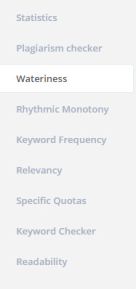
RobotDon is number four.

This web driven app has a lot of useful tools and is simple to use. However, I think the Plagiarism check in Grammarly works better than RobotDon. If you already have a program that helps you with all of these items you might want to pass.
Robotdon

Me- I’ll pass on RobotDon and continue to use Grammarly. In this instance, “you get what you pay for” is true.

Twords was number five and last in the article.

This is an online app that nudges you to write. You list goals and the app community will remind you if you are falling behind. It provides stats, timed writing and prompts should you get stuck.twords
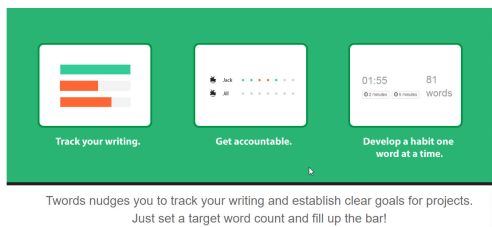
Me- I’ll pass on Twords. This looks fun but distracting. I use Scrivener for stats and my progress details.

If you want to read the entire article By  and his take is on these 5 writing tools click on the link below at the bottom of this post.

Okay, tell me– Do you have enough writing apps?

Do you think they are all becoming redundant?

I’d love to hear from you! Click the “write me” tab or contact me on Twitter @jeancogdell, Facebook at jean.cogdell and Amazon.com, stop by and say hey! The lights are on and I’m waiting.

Please remember to share this post with your Twitter  peeps and Facebook fans.

Creating Killer Content: 5 Easy to Use Tools for Better Writing in Less Time

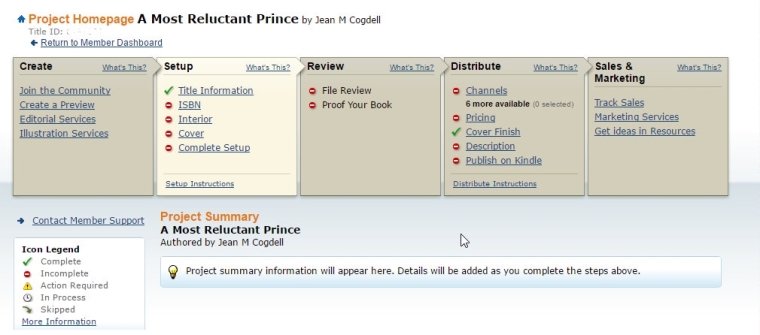
As promised, here are the tools I selected for my books

I use two.

IngramSpark/Lightening Source and Createspace for my print books

Amazon KDP for the e-book.

IngramSpark Print Distributes to brick and mortar retailers, bookstores and libraries file.  If you ever hope to put a print book in a bookstore or at your local library this is where you want to be. Accepted for download is only PDF. E-Book Distribution to online e-retailers but accepted download only epub. IngramSpark does NOT provide free ISBNs. Customer service is very responsive and helpful.

Createspace has very easy to use with the step-by-step instructions. You can upload your work as a print-ready .pdf, .doc, .docx, or .rtf. Your page count will be detected and an automated print check will run once your upload is complete. You’ll be able to see any issues online using the Interior Reviewer tool. Createspace does provide free ISBN or you can use your own.

Another plus is that should you choose, you can let Createspace convert and send to KDP for ebook publication.

createspace

One note: I prefer to purchase and use my own ISBN. Yes, this does add cost but also gives me a little bit more control.

So how to you convert and publish your books? Print and e-book?

Do you do conversions using third-party tools or do you let the printer tools available on their websites?

Talk to us in the comments. Or click the “write me” tab or contact me on Twitter @jeancogdell, Facebook at jean.cogdell and Amazon.com, stop by and say hey! The lights are on and I’m waiting.

Please remember to share this post with your Twitter  peeps andFacebook fans.

How to select the best ebook conversion tool

Too many choices!

But fortunately, there is one that will work for you.

And thanks to 

So if you’re ready to convert and upload that best-selling book, keep reading.

Amazon KDP

KDP accepts ePub, Word doc/docx, HTML, mobi formats. Output mobi, and HTML.  In my book Tryouts for Ben, I uploaded a Word docx and had little trouble. I agree with David; it’s easy and almost fool-proof.  Don’t waste your time using fancy fonts, or formatting, because KDP will not recognize most of them. However, if you are confident with HTML, and CSS format, you can edit the converted file in HTML.

Barnes and Noble Nookbook

I’ve not converted any of my books to Nookbook. But David assures us it’s fairly straightforward. But doesn’t allow for HTML editing.

KOBO

Again, I’ve not yet used KOBO. It appears to be less than user-friendly and not sure I’ll bother with it. David didn’t appear to be impressed.

DRAFT2DIGITAL (D2D)

D2D accepts ePub, Word doc/docx, RTF files, and the output is ePub, mobi, or PDF. I did consider D2D but wasn’t happy with their conversion tool.

SMASHWORDS

Smashwords accepts files in ePub, Word doc (not docx.) Note: this means you must save your manuscript in the older version of Word.  Out put is impressive: ePub, mobi, PDF, PDB, lit, TXT, and many more. Again, this is one I considered but decided it wasn’t for me.

So which tool did I use?

computer-frogs 2

Check back tomorrow.

But in the meantime, head over and read David’s entire article.

The Convertible Cloud: Ebook Conversion Online

Click the “write me” tab or contact me onTwitter @jeancogdell, Facebook at jean.cogdell and Amazon.com, stop by and say hey! The lights are on and I’m waiting.

Please remember to share this post with your Twitter  peeps andFacebook fans.

Do you know if you are suffering from brain-drain?

hello-summer 1281232_640

But Beware of Summer Brain-drain!braindrain

An affliction that slips up on you along with the rising temperatures, humidity,thermometer-153138_640

and buzzing mosquitoes.

mosquito blood-158837_640

You may not notice it at first. Your brain cells and ideas drain away slowly when you decide to take a few days to welcome the sun and blue skies.sun-151763_640

Next, you’ll decide to skip a day of writing or blogging. I mean one day won’t hurt, or even a couple. Right? But before long a week has passed, you’ve forgotten a much-needed password and discover your muse is missing. You’ve developed foggy brain and reached the summer danger zone.

How do you combat this affliction , and survive until fall?

The cure for brain-drain can be done as you enjoy the summer.

  • Read good books. Notice the plural. One won’t get the job done.
  • Write. Write every day, even if it’s just fifty words. The writing doesn’t have to be prize winning. Once you get started, a sentence or two will become a paragraph and stop the brain-drain.
  • Music. Listen to music. It feeds the soul.
  • Watch old movies. That’s right old movies. Because the writers didn’t rely on “special effects” as much as the newer ones.

beach books-918521_640

Do you suffer from brain-drain?

What do you do to keep the mind moving right along during hot summer days?

Let us know- leave a comment!

I’d love to hear from you! Click the “write me” tab or contact me on Twitter @jeancogdell, Facebook at jean.cogdell and Amazon.com, stop by and say hey! The lights are on and I’m waiting.

Please remember to share this post with your Twitter  peeps andFacebook fans.