To Grandmother’s House We Go

The Daily Post Prompt: Frail

Mom wrapped the warm apple pie in her best kitchen towel before she placed it in the Chiquita banana box. The smell of apples and cinnamon filled the old station wagon. My mouth watered as visions of homemade vanilla ice cream over hot pie danced in my head.

My nose plastered against the window I watched until our house faded in the distance.

“How long before we get to Grandma’s?”

“Geez Mark, we just left,” I said. God little brothers can be so annoying.

“So.”

“Don’t start kids.” Dad caught my eye in the rearview mirror.

“Mark, it’s just a short drive. It won’t take long.” Mom said.

Distance and time are different to adults. Stuck in a car with a six-year-old little brother for even a short drive can seem like an eternity. But eventually Dad turned on to an old road and as if by magic an old farmhouse appeared.

homestead-623858_640

“Oh, dear.” Mom said.

“Yeah, but she refuses to let me hire anyone to help.”

Dad cut the engine. The four of us sat in silence staring at peeling paint, and a sagging front porch. Cardboard covered one of the window panes to the right of the door.

Was this where my dad grew up? Where were the apple trees he used to climb? My head swiveled toward the barn or what was left of it, fence rails and posts lay on the ground. No cows or chickens ambled to greet us.

“Kids, be on your best behavior. Remember your grandmother is old and I expect you to be respectful. I don’t…

A loud bang interrupted Dad’s lecture. Mom jumped, her hand flew to her chest as if shot. The screen door slammed against the house as Grandma stepped through the doorway.

“You getting out or what?”

Nothing frail about the voice that boomed from the tiny gray-haired woman as she glared at us from the porch.

“Hi, Mom.” Dad waved as he stepped from the car.

Sawdust filled my mouth, no longer watering for the taste of apple pie and ice cream.


Prompts are fun!

It’s been a while since I posted a prompt. Hope you enjoyed this one.

Have you written any good prompts lately?

What are your favorite prompt sites?

I’d love to hear from you! Click the “write me” tab or contact me onTwitter @jeancogdell, Facebook at jean.cogdell and Amazon.com, stop by and say hey! The lights are on and I’m waiting.

Please remember to share this post with your Twitter  peeps andFacebook fans.

Do you know all of the rules?

There are a lot of writing rules. Some good and some open to the writers interpretation.

Me? I think all rules are made to be broken. 

That’s my opinion and I’m sticking to it.

How boring would life be if everyone did everything in the same way? All shades of gray! Every story would read the same!

Individuality is what makes each story, each book and every writer unique and special.

Writing rules are like opinions. Everyone has one or more. But that doesn’t mean those ideas or rules are written on tablets brought down from Mount Sinai.

commandment-1431061_640

This  Latest Blog Post at JaneFriedman.com is a great reminder to follow your heart.

The article written by gives us 5 pieces of advice to ignore. Of course, I’m sure there are more out there, but 5 is a good place to start.

  1. Weather? Okay!
  2. Dialogue? Get talking!
  3. Backstory? If needed, yes!
  4. Write What You Know? If you love it!
  5. Don’t Ever Follow Any Writing Advice? Only if you know everything!

This is a great post. Click on the link below to read the entire article.

Do you have a “rule” that needs breaking?

Know of a “rule” that is over done?

Do you think writers get caught up in too many rules?

Do share, I want to know. Leave me a comment or click the “write me” tab or contact me on Twitter @jeancogdell, Facebook at jean.cogdell and Amazon.com, stop by and say hey! The lights are on and I’m waiting.

Please remember to share this post with your Twitter  peeps and Facebook fans.

5 Pieces of Writing Advice You Should Ignore 

Do you think more tools make a better writer?

At some point I think we have to settle on one or two and just write.

What about you?

Each week it seems as if I’m finding more and more apps and programs for writers/bloggers. But downloading and using the latest and greatest can become more confusing than easier. At least for me.

At what point are we just reinventing the wheel?

Here’s my take on the 5 I found this week in a recent article on Business.com,  Posted By . These tools are supposed to help the writer/blogger write better and faster.

You be the judge.

The first one listed is an app called Help Me Write.

This is a web-based app to help you decide what to write next.

  • You write your ideas on a profile page.
  • Next, share via Twitter, Facebook, blog (or wherever) and ask your networks, which or if, they would like to read.
  • Pick the idea with the most interest and write an article, post or story, then send directly to all the voters.

For a regular blogger this is supposed to get readers more engaged with your brand and writing process. For example, you could write a weekly post “ask the audience” post, or get readers to vote on a special project.

Me- I’ll pass. I don’t need another platform to keep up with.

Second on his list was MyBlogU.

This appears to be a brainstorming, community gathering, idea and information generating platform. Whew! That was a mouthful. Here, a writer/blogger can gather information from experts and other writers, enabling you to learn as you go.

MyBLogU concept

Me- I’ll pass on MyBlogU. Once again this crowdsourcing platform seems as if it would take more time than I’ve got to give.

The Hemingway App was #Three.

This is a desktop app I’ve used and like.

Mainly for the readability feature. I can see in a second the readability level of my writing. It will also highlight which sentences are hard to read, complex or simple. Hemingway Editor doesn’t take a lot of time and is super easy to use.

Hemingway

Me- I’ll continue to use Hemingway Editor.

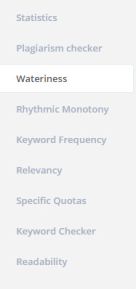
RobotDon is number four.

This web driven app has a lot of useful tools and is simple to use. However, I think the Plagiarism check in Grammarly works better than RobotDon. If you already have a program that helps you with all of these items you might want to pass.

Robotdon

Me- I’ll pass on RobotDon and continue to use Grammarly. In this instance, “you get what you pay for” is true.

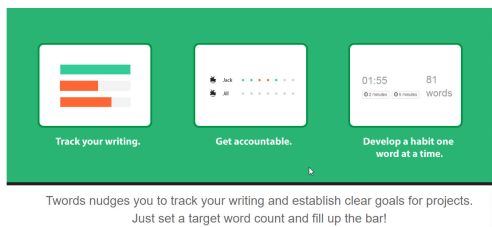
Twords was number five and last in the article.

This is an online app that nudges you to write. You list goals and the app community will remind you if you are falling behind. It provides stats, timed writing and prompts should you get stuck.twords

Me- I’ll pass on Twords. This looks fun but distracting. I use Scrivener for stats and my progress details.

If you want to read the entire article By  and his take is on these 5 writing tools click on the link below at the bottom of this post.

Okay, tell me– Do you have enough writing apps?

Do you think they are all becoming redundant?

I’d love to hear from you! Click the “write me” tab or contact me on Twitter @jeancogdell, Facebook at jean.cogdell and Amazon.com, stop by and say hey! The lights are on and I’m waiting.

Please remember to share this post with your Twitter  peeps and Facebook fans.

Creating Killer Content: 5 Easy to Use Tools for Better Writing in Less Time

As promised, here are the tools I selected for my books

I use two.

IngramSpark/Lightening Source and Createspace for my print books

Amazon KDP for the e-book.

IngramSpark Print Distributes to brick and mortar retailers, bookstores and libraries file.  If you ever hope to put a print book in a bookstore or at your local library this is where you want to be. Accepted for download is only PDF. E-Book Distribution to online e-retailers but accepted download only epub. IngramSpark does NOT provide free ISBNs. Customer service is very responsive and helpful.

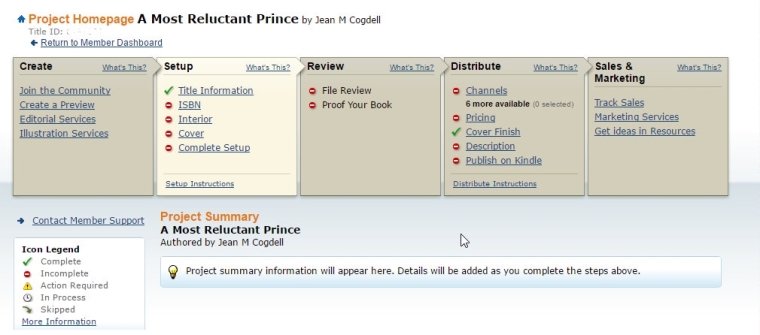
Createspace has very easy to use with the step-by-step instructions. You can upload your work as a print-ready .pdf, .doc, .docx, or .rtf. Your page count will be detected and an automated print check will run once your upload is complete. You’ll be able to see any issues online using the Interior Reviewer tool. Createspace does provide free ISBN or you can use your own.

Another plus is that should you choose, you can let Createspace convert and send to KDP for ebook publication.

createspace

One note: I prefer to purchase and use my own ISBN. Yes, this does add cost but also gives me a little bit more control.

So how to you convert and publish your books? Print and e-book?

Do you do conversions using third-party tools or do you let the printer tools available on their websites?

Talk to us in the comments. Or click the “write me” tab or contact me on Twitter @jeancogdell, Facebook at jean.cogdell and Amazon.com, stop by and say hey! The lights are on and I’m waiting.

Please remember to share this post with your Twitter  peeps andFacebook fans.