Posts

Do you know all of the rules?

There are a lot of writing rules. Some good and some open to the writers interpretation.

Me? I think all rules are made to be broken. 

That’s my opinion and I’m sticking to it.

How boring would life be if everyone did everything in the same way? All shades of gray! Every story would read the same!

Individuality is what makes each story, each book and every writer unique and special.

Writing rules are like opinions. Everyone has one or more. But that doesn’t mean those ideas or rules are written on tablets brought down from Mount Sinai.

commandment-1431061_640

This  Latest Blog Post at JaneFriedman.com is a great reminder to follow your heart.

The article written by gives us 5 pieces of advice to ignore. Of course, I’m sure there are more out there, but 5 is a good place to start.

  1. Weather? Okay!
  2. Dialogue? Get talking!
  3. Backstory? If needed, yes!
  4. Write What You Know? If you love it!
  5. Don’t Ever Follow Any Writing Advice? Only if you know everything!

This is a great post. Click on the link below to read the entire article.

Do you have a “rule” that needs breaking?

Know of a “rule” that is over done?

Do you think writers get caught up in too many rules?

Do share, I want to know. Leave me a comment or click the “write me” tab or contact me on Twitter @jeancogdell, Facebook at jean.cogdell and Amazon.com, stop by and say hey! The lights are on and I’m waiting.

Please remember to share this post with your Twitter  peeps and Facebook fans.

5 Pieces of Writing Advice You Should Ignore 

Do you think more tools make a better writer?

At some point I think we have to settle on one or two and just write.

What about you?

Each week it seems as if I’m finding more and more apps and programs for writers/bloggers. But downloading and using the latest and greatest can become more confusing than easier. At least for me.

At what point are we just reinventing the wheel?

Here’s my take on the 5 I found this week in a recent article on Business.com,  Posted By . These tools are supposed to help the writer/blogger write better and faster.

You be the judge.

The first one listed is an app called Help Me Write.

This is a web-based app to help you decide what to write next.

  • You write your ideas on a profile page.
  • Next, share via Twitter, Facebook, blog (or wherever) and ask your networks, which or if, they would like to read.
  • Pick the idea with the most interest and write an article, post or story, then send directly to all the voters.

For a regular blogger this is supposed to get readers more engaged with your brand and writing process. For example, you could write a weekly post “ask the audience” post, or get readers to vote on a special project.

Me- I’ll pass. I don’t need another platform to keep up with.

Second on his list was MyBlogU.

This appears to be a brainstorming, community gathering, idea and information generating platform. Whew! That was a mouthful. Here, a writer/blogger can gather information from experts and other writers, enabling you to learn as you go.

MyBLogU concept

Me- I’ll pass on MyBlogU. Once again this crowdsourcing platform seems as if it would take more time than I’ve got to give.

The Hemingway App was #Three.

This is a desktop app I’ve used and like.

Mainly for the readability feature. I can see in a second the readability level of my writing. It will also highlight which sentences are hard to read, complex or simple. Hemingway Editor doesn’t take a lot of time and is super easy to use.

Hemingway

Me- I’ll continue to use Hemingway Editor.

RobotDon is number four.

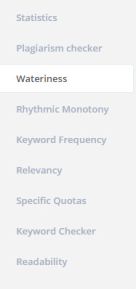
This web driven app has a lot of useful tools and is simple to use. However, I think the Plagiarism check in Grammarly works better than RobotDon. If you already have a program that helps you with all of these items you might want to pass.

Robotdon

Me- I’ll pass on RobotDon and continue to use Grammarly. In this instance, “you get what you pay for” is true.

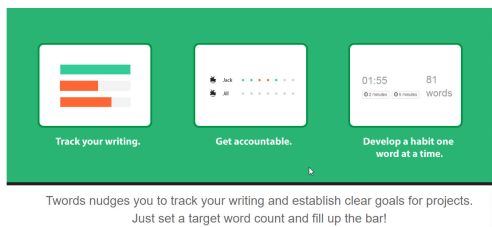
Twords was number five and last in the article.

This is an online app that nudges you to write. You list goals and the app community will remind you if you are falling behind. It provides stats, timed writing and prompts should you get stuck.twords

Me- I’ll pass on Twords. This looks fun but distracting. I use Scrivener for stats and my progress details.

If you want to read the entire article By  and his take is on these 5 writing tools click on the link below at the bottom of this post.

Okay, tell me– Do you have enough writing apps?

Do you think they are all becoming redundant?

I’d love to hear from you! Click the “write me” tab or contact me on Twitter @jeancogdell, Facebook at jean.cogdell and Amazon.com, stop by and say hey! The lights are on and I’m waiting.

Please remember to share this post with your Twitter  peeps and Facebook fans.

Creating Killer Content: 5 Easy to Use Tools for Better Writing in Less Time

Everyone needs a little applause now and again

The encouragement and help of so many writers and readers have helped to make me a better writer. I would have probably thrown in the towel by now without it. So, today I’d like to pay it forward.

Let’s give a big hand of encouragement to Jacqui Murray, author of the popular Building a Midshipman, who is revealing the cover of her new book.

To Hunt a Sub

THAS-small

The USS Hampton SSN 767 quietly floated unseen a hundred fifty-two feet below the ocean’s surface. Despite its deadly nuclear tipped arsenal of Trident missiles, its task for the past six months has been reconnaissance and surveillance. The biggest danger the crew faced was running out of olives for their pizza. That all changed one morning, four days before the end of the Hampton’s tour. Halfway through the Captain’s first morning coffee, every system in the submarine shut down. No navigation, no communication, and no defensive measures. Within minutes, the sub began a terrifying descent through the murky grays and blacks of the deep Atlantic and settled to the ocean floor five miles from Cuba and perilously close to the sub’s crush depth. When it missed its mandated contact, an emergency call went out to a retired Navy Intel officer, Zeke Rowe, top of his field before a botched mission left him physically crippled and psychologically shaken. Rowe quickly determined that the sub was the victim of a cyber virus secreted inside the sub’s top secret operating systems.  What Rowe couldn’t figure out was who did it or how to stop it sinking every other submarine in the American fleet. 

Kali Delamagente is a struggling, over-the-hill grad student who entered a DARPA cyber security competition as a desperate last hope to fund a sophisticated artificial intelligence she called Otto. Though her presentation imploded, she caught the attention of two people: a terrorist intent on destroying America and a rapt Dr. Zeke Rowe. An anonymous blank check to finish her research is quickly followed by multiple break-ins to her lab, a hack of her computer, the disappearance of her three-legged dog, and finally the kidnapping of her only son. 

By all measures, Rowe and Delamagente are an unlikely duo. Rowe believes in brawn and Delamagente brains. To save the America they both love, they find a middle ground, guided by the wisdom of a formidable female who died two million years ago.

Book information:

Title and author: To Hunt a Sub by J. Murray

Release Date: August, 2016 by Structured Learning

Genre: Thriller

Preview: Available on Kindle Scout

Cover by: Paper and Sage Design 

Author bio:

Jacqui Murray is the author of the popular Building a Midshipman, the story of her daughter’s journey from high school to the United States Naval Academy. She is the author/editor of over a hundred books on integrating tech into education, adjunct professor of technology in education, webmaster for four blogs, an Amazon Vine Voice book reviewer,  a columnist for TeachHUB, Editorial Review Board member for Journal for Computing Teachers, monthly contributor to Today’s Author and a freelance journalist on tech Ed topics. Her debut novel, To Hunt a Sub, launches this summer. You can find her nonfiction books at her publisher’s website, Structured Learning.

Are you having a launch soon? Do let us know!

I’d love to hear from you! Click the write me tab or contact me on Twitter @jeancogdell, Facebook at  jean.cogdell and Amazon.com, stop by and say hey! The lights are on and I’m waiting.

Please remember to share this post with your Twitter peeps and Facebook Facebook fans.

As promised, here are the tools I selected for my books

I use two.

IngramSpark/Lightening Source and Createspace for my print books

Amazon KDP for the e-book.

IngramSpark Print Distributes to brick and mortar retailers, bookstores and libraries file.  If you ever hope to put a print book in a bookstore or at your local library this is where you want to be. Accepted for download is only PDF. E-Book Distribution to online e-retailers but accepted download only epub. IngramSpark does NOT provide free ISBNs. Customer service is very responsive and helpful.

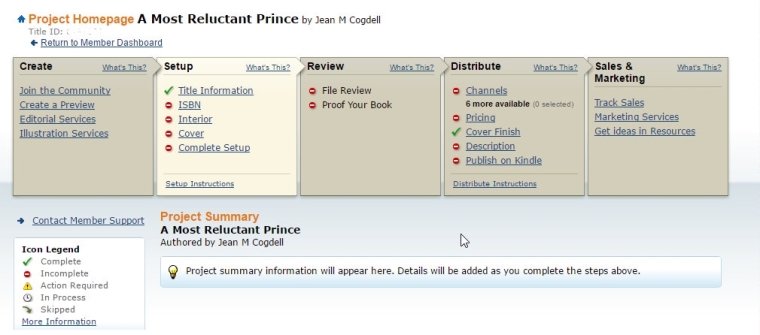
Createspace has very easy to use with the step-by-step instructions. You can upload your work as a print-ready .pdf, .doc, .docx, or .rtf. Your page count will be detected and an automated print check will run once your upload is complete. You’ll be able to see any issues online using the Interior Reviewer tool. Createspace does provide free ISBN or you can use your own.

Another plus is that should you choose, you can let Createspace convert and send to KDP for ebook publication.

createspace

One note: I prefer to purchase and use my own ISBN. Yes, this does add cost but also gives me a little bit more control.

So how to you convert and publish your books? Print and e-book?

Do you do conversions using third-party tools or do you let the printer tools available on their websites?

Talk to us in the comments. Or click the “write me” tab or contact me on Twitter @jeancogdell, Facebook at jean.cogdell and Amazon.com, stop by and say hey! The lights are on and I’m waiting.

Please remember to share this post with your Twitter  peeps andFacebook fans.