Want to know which platform is best for you?

So you’re ready to create a blog.

Or maybe you’re considering a self-hosted website.

Stop and read the following articles below before you decide which way to go. This is one of the best explanations I’ve read in a long time about the differences between WordPress.com and WordPress.org.

After reading and listening to fellow bloggers, I decided to stick with WordPress.com.

My reasons:

  • Although not perfect, it’s a turnkey process.
  • I found a Theme I liked but can change with ease
  • My blog is updated and backed keeping my blog intact online (even though I may lose content I won’t lose the blog.)
  • I don’t want to pay a third-party to support the platform or the security.
  • I don’t have the time to dedicate to running a self-hosted site.

4 Reasons You Should Never Use WordPress.com (And 4 Reasons You Should) by Sanj Sahayam

WordPress.com vs WordPress.org – Which is Better? (Comparison Chart)   by by wpbeginner.com

Did the articles help you understand a little better how WordPress.com and WordPress.org work and how they are different?
Which do you use?
Have you considered a self-hosted site?
Share in the comments. I love hearing from you!

Also, if you can please stop by my other locations and say “hey!” I’ll leave a light on. 

facebook jeans page   twitter-jeans page icon  pinterest-jeans page  stumble-upon-jeans page   amazon jeans page

 OR CLICK THE “WRITE ME” TAB AND SEND ME AN EMAIL.

Do you know the visibility of your website?

Want to know how your blog is doing?

Well, there is an easy, great way to assess, improve and create a better website.

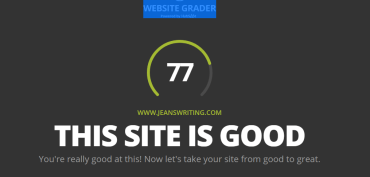
After reading the post from Story Empire Blog below, I followed one of the links provided (WEBSITE GRADER) and here is what I discovered about my blog.

Yay, at last, I managed to get the security part right. But let’s look a little deeper.

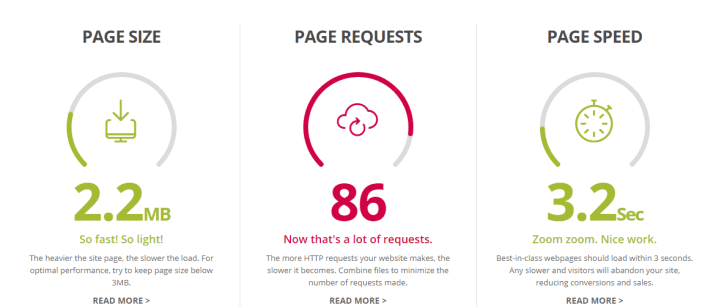
First up Performance, grade 22/30.

Hmm, looks like my HTTP requests need to come down. But not bad.

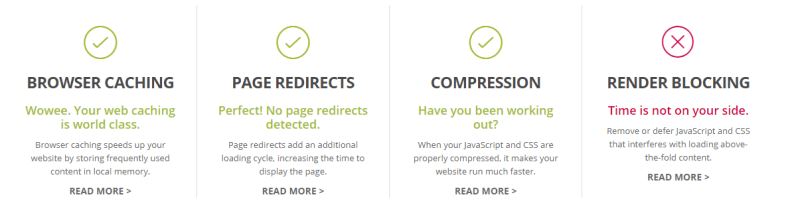
Uh Oh, got an X. I must confess that JavaScript and CSS stuff always leaves me scratching my head. But this weekend I will read up a little on it. After all who wants an X?

Alright, alright! 30/30 on Mobile! Moving on…

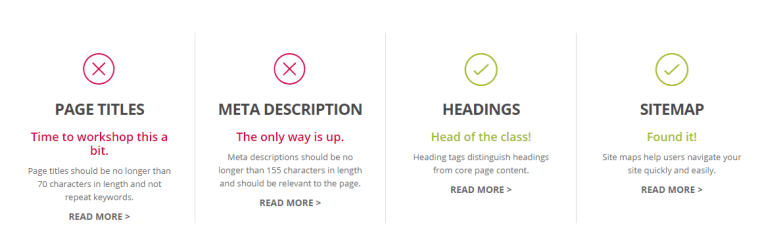
To SEO. Another scary, confusing acronym that totally baffles me. No wonder my website scored 15/30 AND received a big fat X in two areas.

Page Titles, I can handle. Meta descriptions, those may take a while to figure out.

Using the website was super easy. But now I’ve more work to do. The WEBSITE GRADER then gave me a list of suggestions to improve my website.

Guess what I’m doing this weekend? 

The article also has a couple of other suggestions and links you may find interesting, especially if you are new to blogging. So you might want to read the entire post.

How to Improve & Assess Your Site Traffic 

Did you try out the Website Grader?
What do you think?
Does your website need help?
Which area did you score highest/lowest on?
Come on, share in the comments.

I’d love it if you’d stop by my other locations and say “hey!” I’ll leave a light on. 

facebook jeans page   twitter-jeans page icon  pinterest-jeans page  stumble-upon-jeans page   amazon jeans page

 OR CLICK THE “WRITE ME” TAB AND SEND ME AN EMAIL.

Want to know the truth about pop-ups?

Want to Increase Your Blog Readership? Kill that Popup! By Anne R. Allen

Shares with us the unvarnished truth about what readers think of all those pop-ups on your blog.

I agree with Anne.

Here is what I think of pop-ups!

Not gonna keep reading if I have to hunt for a tiny X to close a damn box. Or worse, fill out a form just for the privilege of reading your page. Note not gonna happen.

Ads are not so bad as long as they don’t pop up and obstruct the post. Although I have allowed WordPress to put them on my blog, I’m still on the fence about them.

So stop with the sign-up subscription or buy my book, pop-ups, please.

What do you think?

Agree with Anne? Or do you like them?

Can’t wait to hear your answers. Leave them in the comments.

Please stop by and say “hey!”  I’ll leave a light on. 

You can find me…

Facebook      StumbleUpon    Twitter    Amazon.com

Or to connect with me, click the “write me” tab.

How to make your own giphy

Do you want to make your own greeting giphy?

It’s a lot easier than you think.

new-year

You can use your own short video of family, friends, decorations or just about anything.

But if you don’t have a great video or don’t have the time, use a video from Pixabay.

Here is how step by step:

  1. Save your video.
  2. Go to giphy.com and click on create
  3. Type in your caption, and tags.
  4. Select private or public
  5. Click on Create
  6. Click “Download” to save to your computer

That’s all there is to it! Check out my little tutorial for tips.

Did this help?

Have you made a custom Giphy before?

Send me yours, I’d love to see them.

Leave a comment or click the “write me” tab or look for me on Twitter @jeancogdell, Facebook at jean.cogdell and Amazon.com, stop by and say hey! The lights are on, and I’m waiting.

Please remember to share this post with your Twitter  peeps and Facebook fans.